



 Published:October 28, 2026
 Time to read:5 min
How to Automatically Find Active Accounts Without Open Opportunities in Dynamics 365
A Short Overview of the Article
A Short Reference About the Author
Introduction
Requirement
Step-by-step Instructions
After opening Power Automate and selecting the appropriate environment, follow the steps below to configure the scheduled automation flow:
-
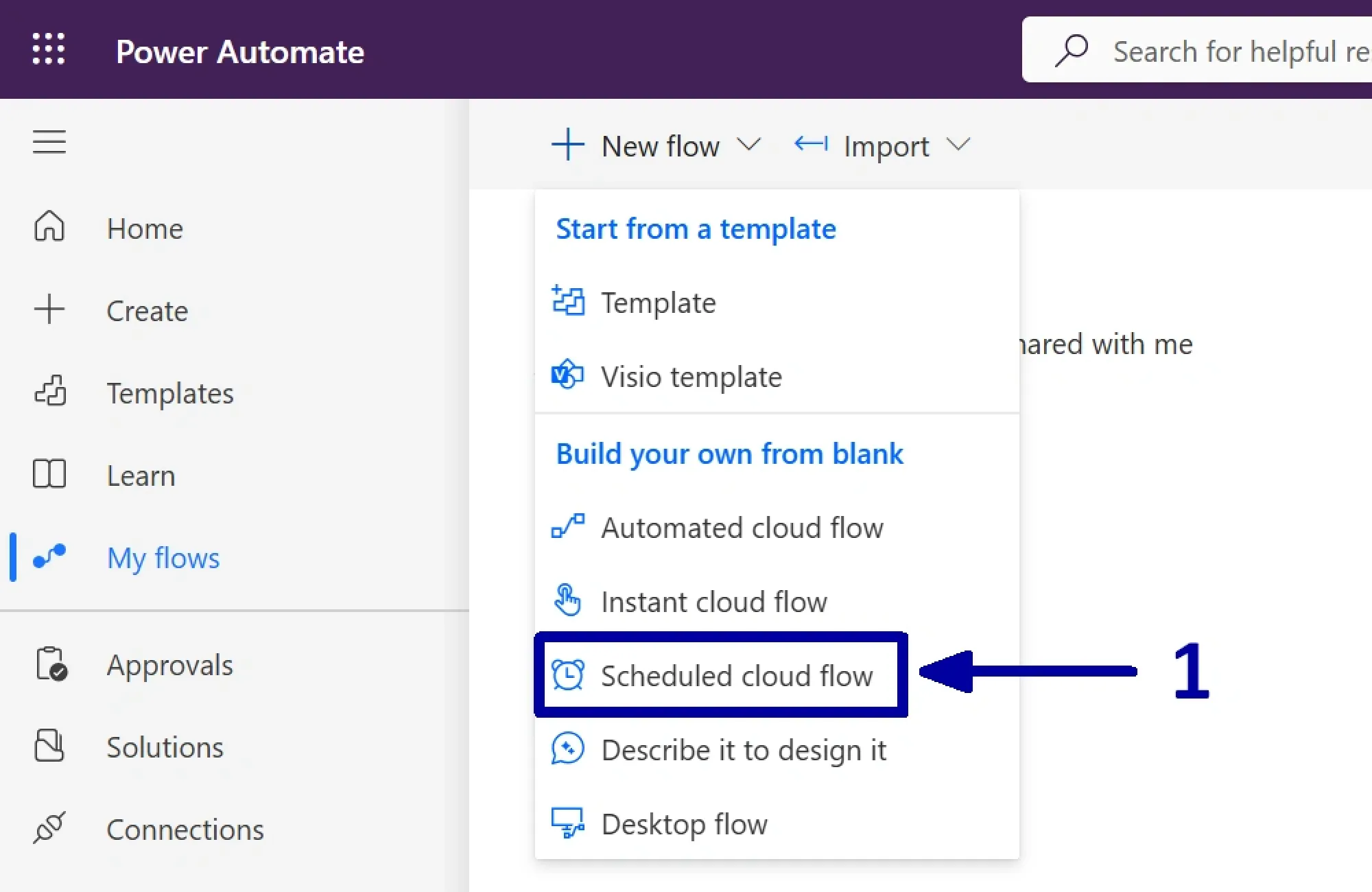
In the environment in which you want to create the automation, select the "New flow", then choose the "Scheduled cloud flow" (1) to begin setting up the flow.
-
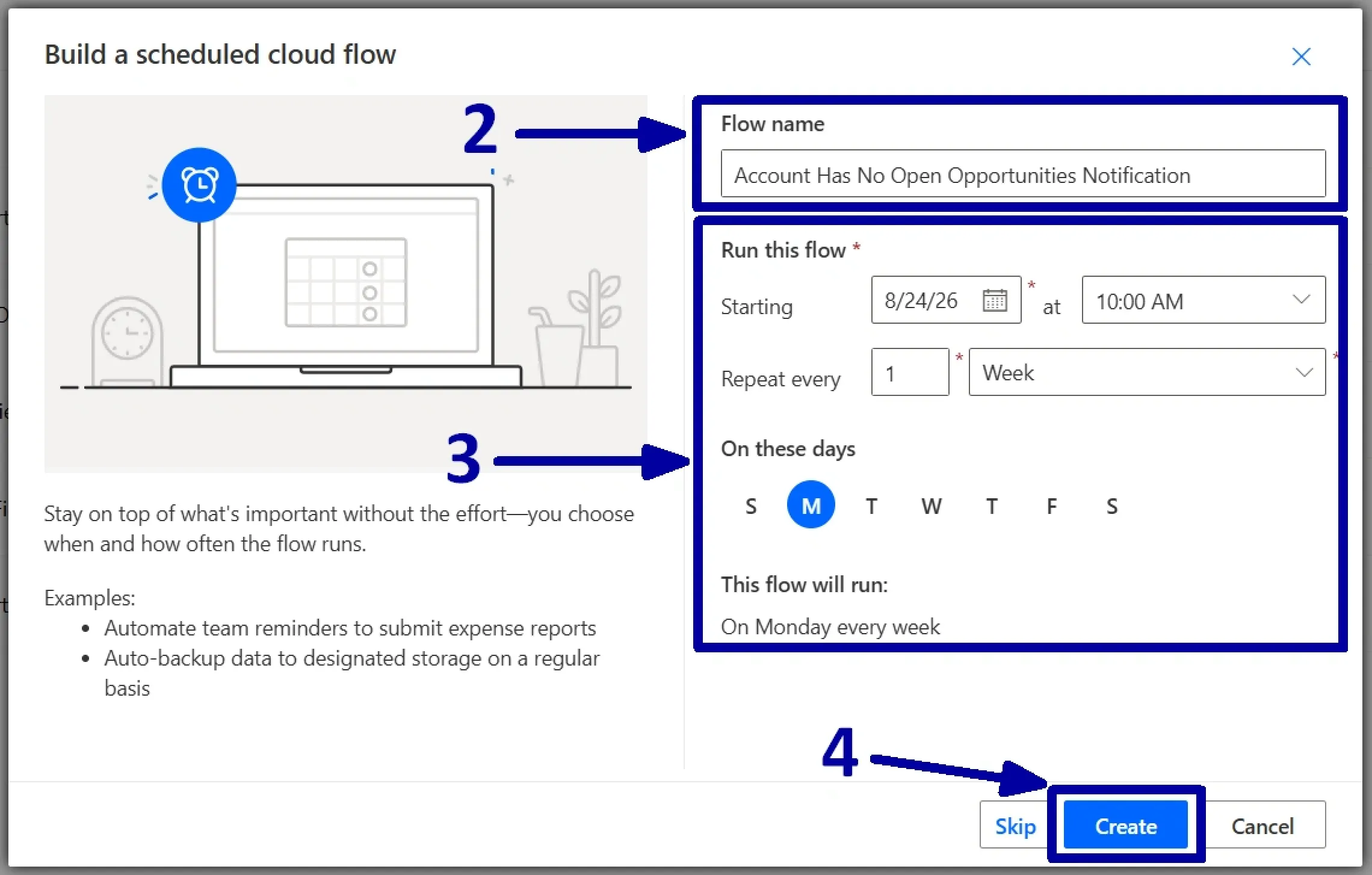
Provide a meaningful name that clearly describes the purpose of the flow (2). Next, specify the start date, start time, and recurrence frequency to define when and how often the flow should run (3). Once all the required details have been configured, click on the "Create" (4) to generate the flow.
-
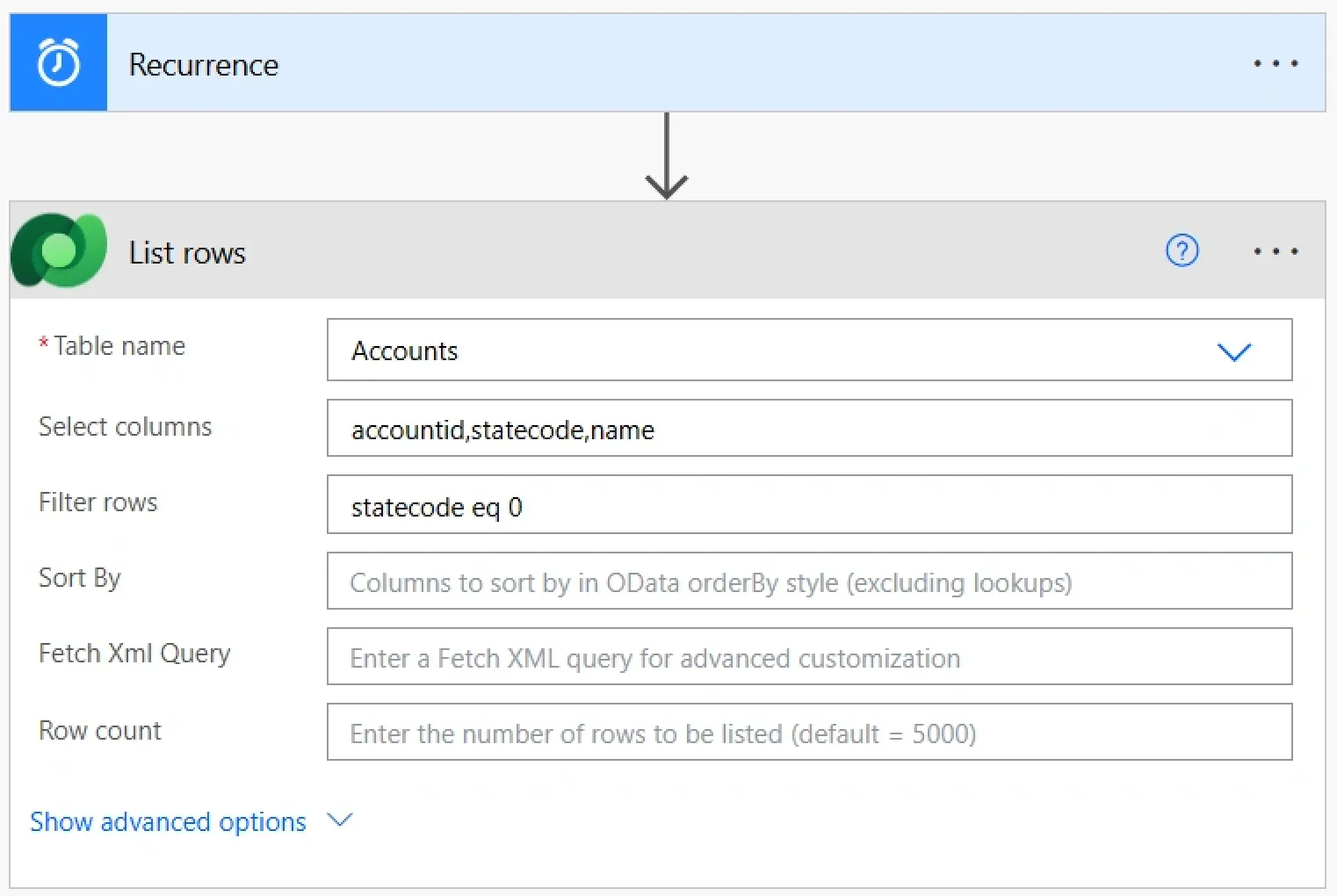
After the flow has been created, verify the configuration of the "Recurrence" trigger to ensure that the start date, time, and recurrence interval match the settings defined in the previous step. After confirming that the schedule is accurate, add a "List rows" action to fetch the corresponding records. Since the objective is to review account records, select the "Accounts" table from the "Table name" field.
! Note. The "Account ID" is needed to look for related opportunities, so if you are using the "Select columns" field, do not forget to add this data. And because we are planning to work only with active accounts, please do not forget to add the corresponding filter also.
-
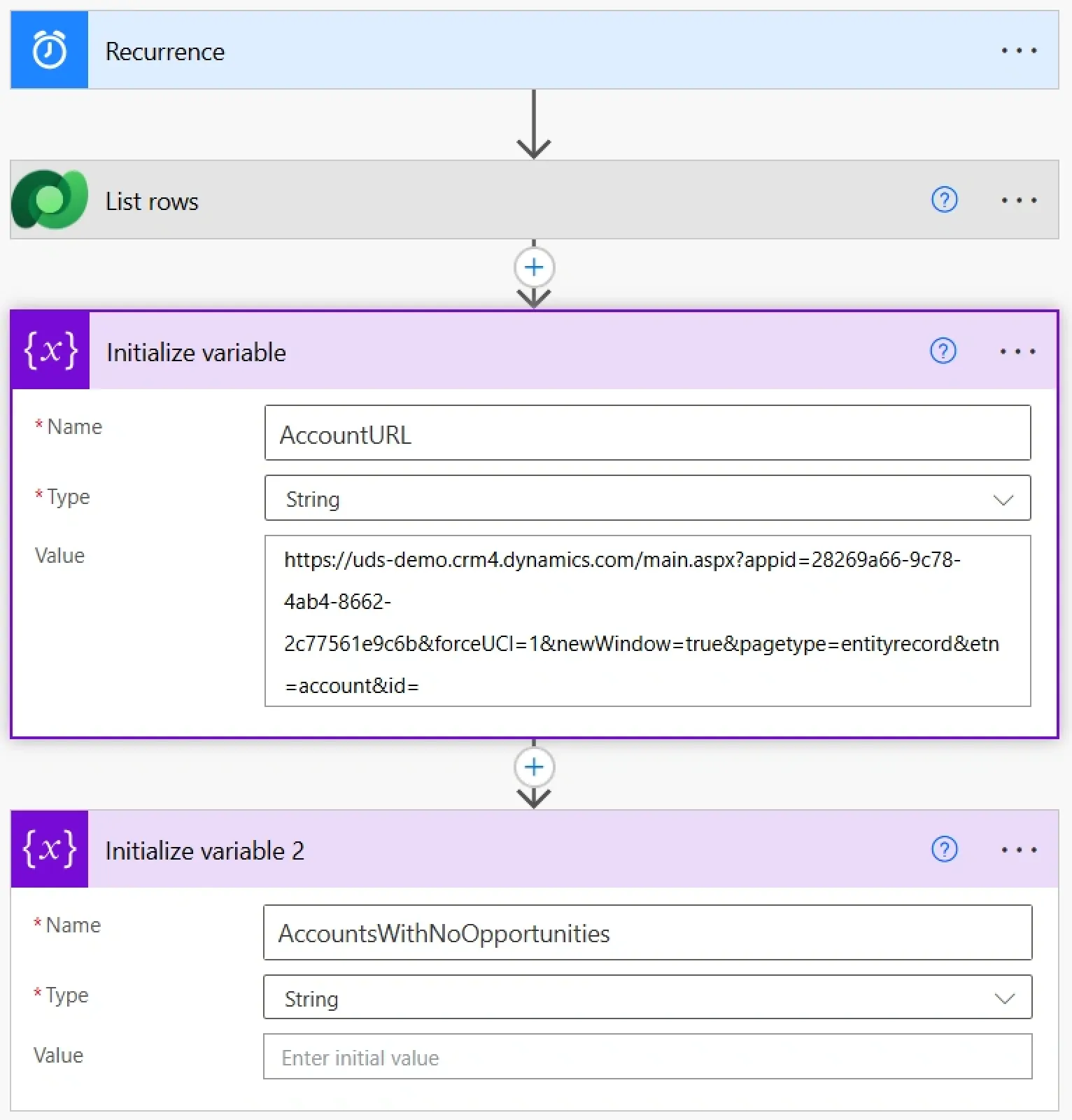
Next, define a variable to be used in the email notification. After that, open any "Account" record in Dynamics 365 and copy the URL up to and including the final "=" character, just before the record's GUID. This will serve as the base URL for dynamically generating links to individual contact records.
! Note. Also, initialize a string variable to hold all the information you want to include in the message.
-
Now, it is time to search if accounts from the first "List rows" step have an open opportunity. For that, we need to create another "List rows" step, but this time, because we will be going through opportunities, select the "Opportunities" table in the "Table name" field.
In the "Filter rows" table, we need to combine two filters: the first one, to select only the opportunities related to the account from the first "List rows" step ("Apply to each" step is created automatically for this filter), and the second one, to make sure that the opportunity is open.
! Note. It is not a mistake: we are looking for at least one open opportunity by setting 1 in the "Row count" field.
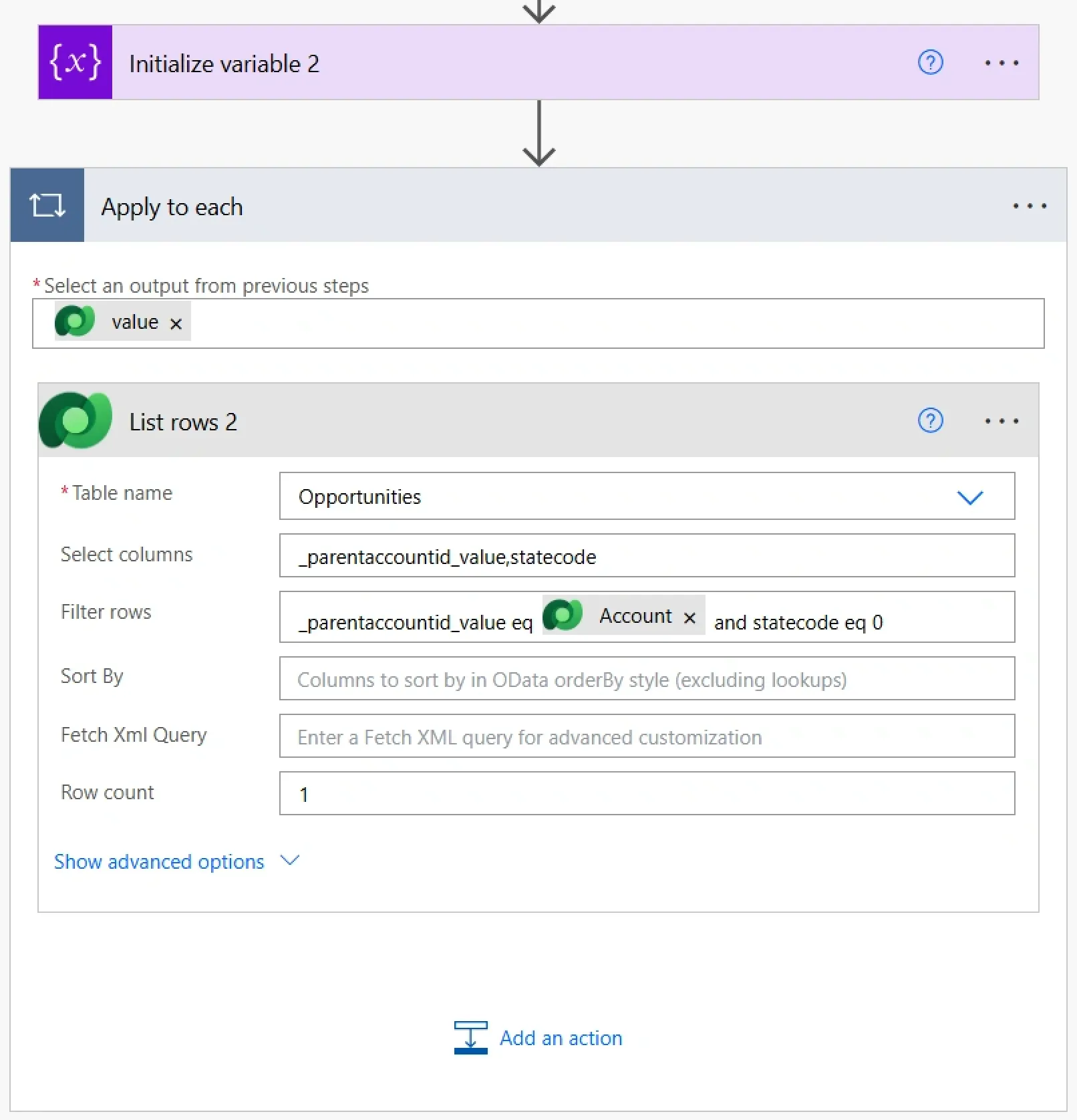
-
In this step, we need to check if no open opportunity was found, and if it is the case, collect the required information about an account. For this, we will add a "Condition" action with the "Length" function to the "Apply to each" step.
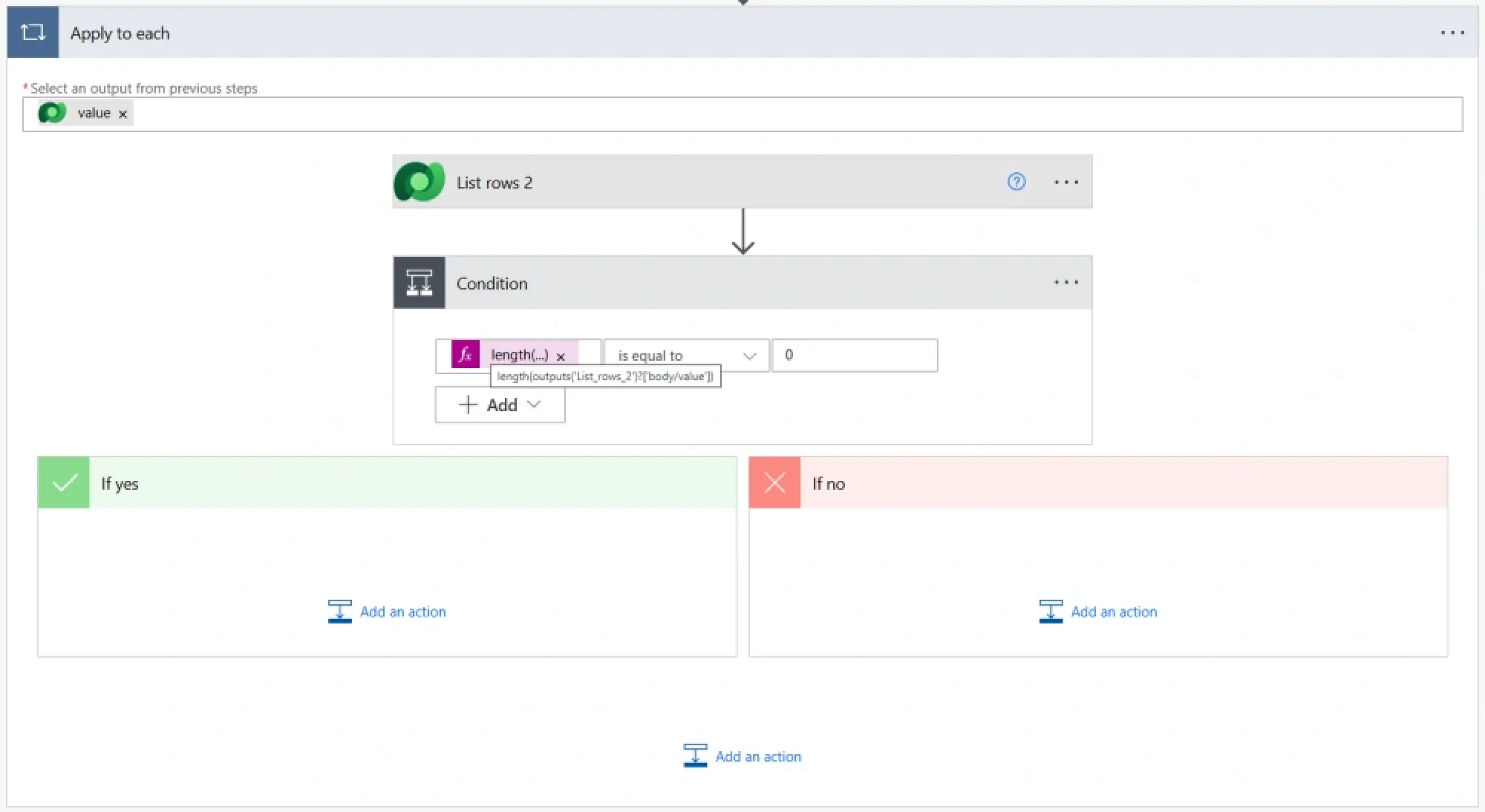
-
In our case, if the condition is met (no open opportunities found), we will combine all the accounts into a single piece of text using the "Append to string variable" step.
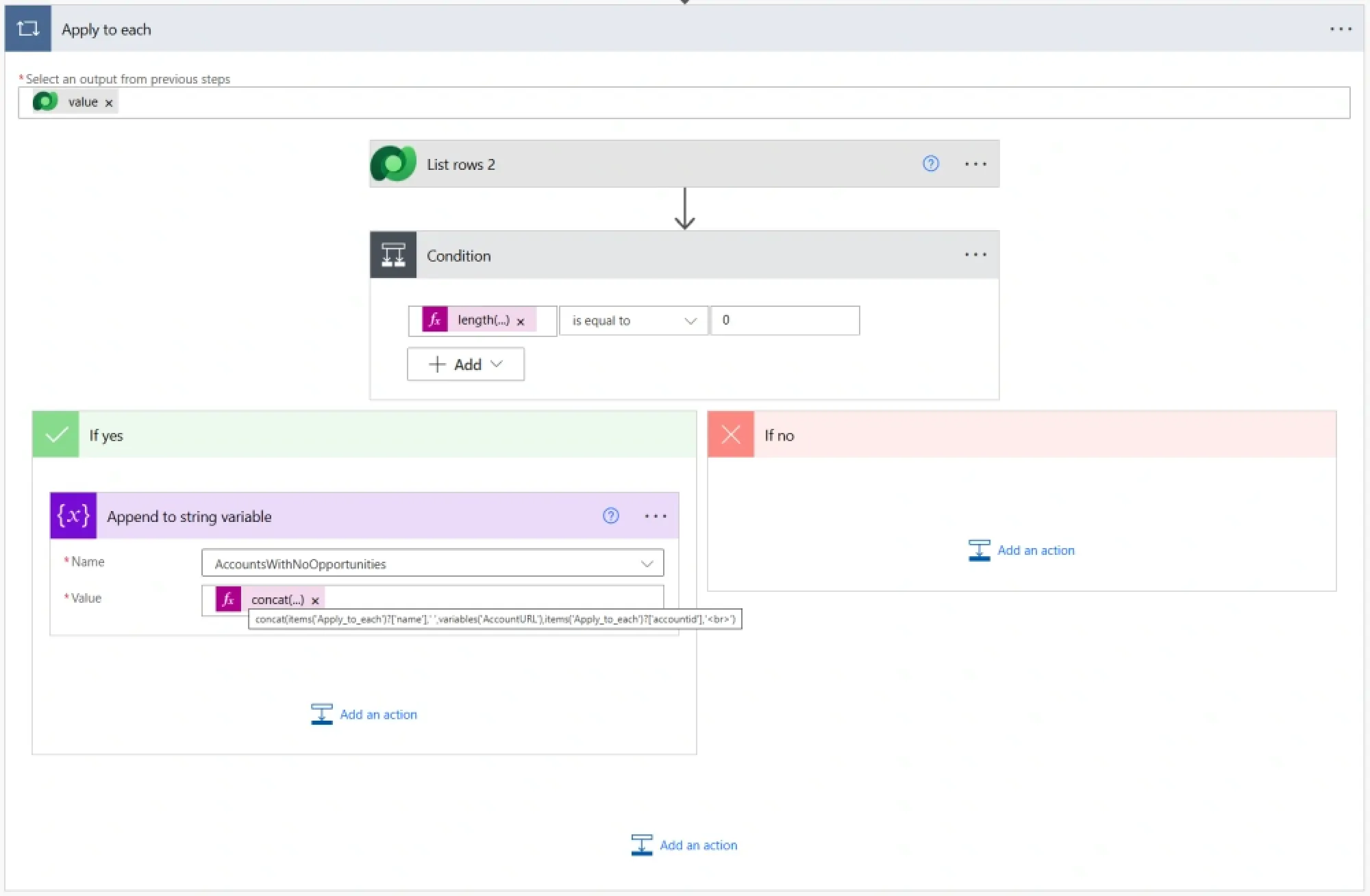
-
The last step in this tutorial is about creating the email notification. Follow these instructions:
1Add a new "Send an email" step.
2Add the sales manager's email address in the "To" field.
3Create a subject.
4Switch the email body to the HTML format.
5Apply the string variable as the primary content of the email.
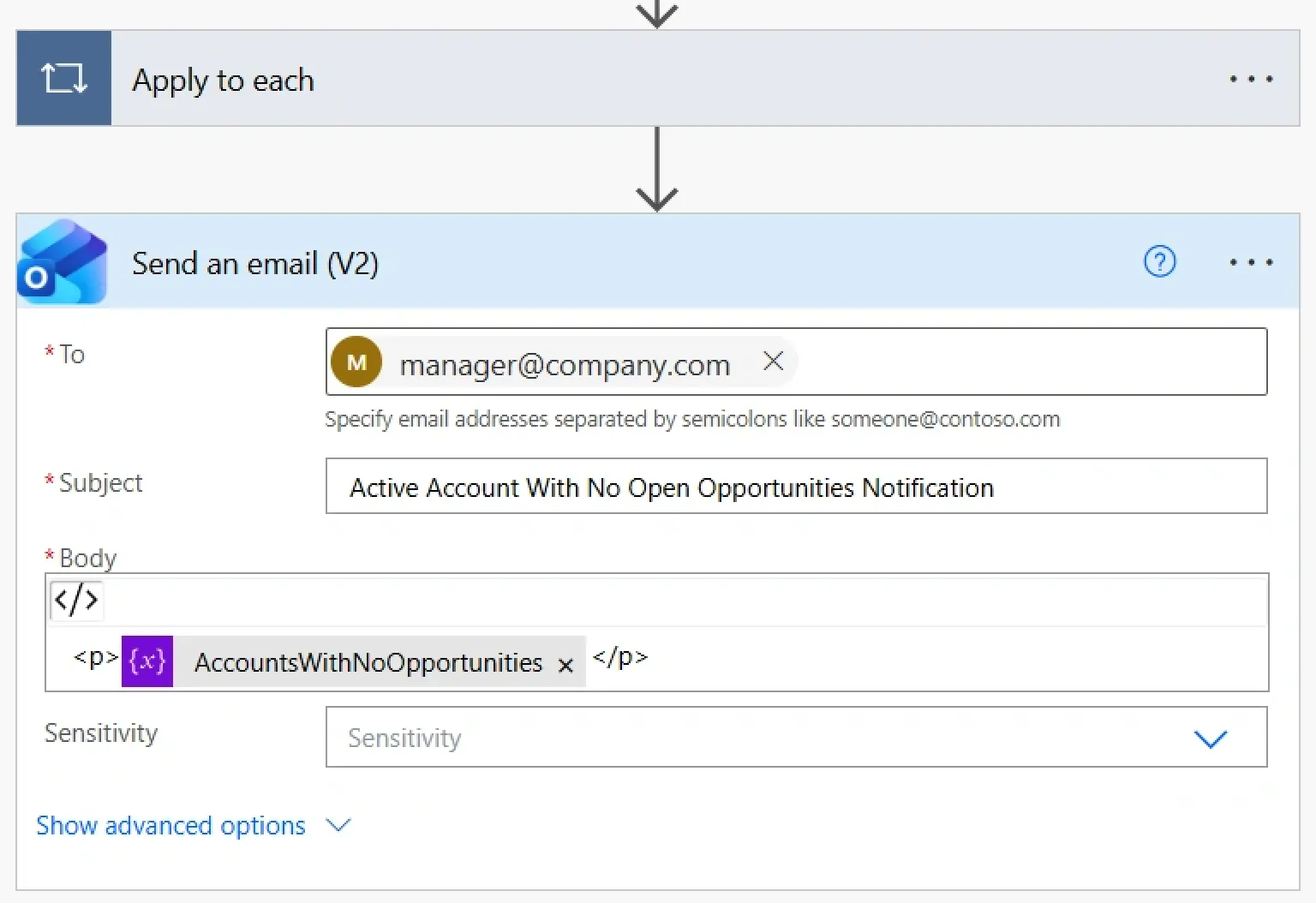
Beginning on the following Monday, the flow will run automatically every week to identify active accounts that have no open opportunities. It will then compile the results, including each account's name and a direct link to its record, into a single email and send it to the sales manager.
Instead of manually reviewing customer records, the team will receive a ready-to-use list of accounts that may be worth contacting again.
Conclusion
Frequently Asked Questions that May Interest You
The report helps sales teams identify existing customers who may have been overlooked and could represent potential opportunities for upselling, cross-selling, or contract renewals. As part of effective Microsoft Dynamics 365 account management, the automated weekly email allows sales managers to ensure these accounts receive appropriate attention without manually reviewing CRM records.
The email contains a consolidated list of active accounts without open opportunities, including each account name and a direct link to its record in Dynamics 365. This supports best practices for account management in Dynamics 365 Sales by helping sales representatives identify customer engagement gaps, maintain stronger relationships, and uncover new sales opportunities.
The flow is configured to run every Monday morning using a Scheduled cloud flow in Power Automate. It automatically checks active accounts for open opportunities and sends a single email containing the accounts that have no open opportunities.
This automated process supports sales pipeline management by giving sales managers a regular overview of accounts that may require attention. It also reduces manual reporting efforts and helps teams plan their weekly outreach and sales activity reminders more effectively.
Yes. You can customize the flow by adding filters and conditions to focus on specific accounts. For example, you can exclude newly created accounts, include only accounts whose last opportunity was closed more than a month ago, filter by revenue level, or exclude accounts with recently lost opportunities.
These customizations help businesses tailor Dynamics 365 account management features to their sales processes and customer engagement strategies. Additional criteria can also support more targeted opportunity management in Dynamics 365 Sales, enabling sales teams to prioritize accounts based on revenue potential, engagement history, and renewal timelines.
Notifications help sales teams manage opportunities by keeping them informed about important updates, upcoming follow-ups, and changes in deal status. They alert sales representatives when leads engage, tasks are due, deals move through the pipeline, or action is needed, helping teams respond promptly and avoid missed opportunities.
By providing timely reminders and real-time updates, notifications improve prioritization, strengthen customer relationships, and help sales teams keep deals moving toward closure. Opportunity update notifications and sales activity reminders also help representatives coordinate follow-ups, monitor progress, and maintain accurate opportunity records, supporting more effective sales pipeline management.
You can automate opportunity notifications using Microsoft Power Automate by creating an automated or scheduled cloud flow connected to Microsoft Dataverse, which stores Dynamics 365 Sales data.
For example, configure a flow to trigger when an opportunity is created or updated, then add conditions to identify important changes, such as a change in opportunity status, an upcoming close date, or a missing follow-up. The flow can send an email or a Microsoft Teams notification to the opportunity owner or sales manager.
You can also use scheduled flows to send reminders for overdue activities or summarize opportunities that need attention. These opportunity update notifications help teams act quickly, while automated sales activity reminders reduce the risk of missed follow-ups.
To track sales opportunities by account in Dynamics 365 Sales, open the relevant account record and review its related opportunities. You can examine opportunity details such as estimated revenue, sales stage, status, expected close date, and assigned sales representative.
Using account views, dashboards, and reports can help sales managers understand which customers have active deals, which opportunities have been won or lost, and which accounts have no open opportunities. This approach supports opportunity management in Dynamics 365 Sales and provides better visibility into account performance and the overall sales pipeline.
For more advanced reporting, you can use Power BI or customized Dataverse views to analyze opportunities by account, compare revenue potential, and identify customers who may benefit from additional outreach.
The best practices for account management in Dynamics 365 Sales include maintaining accurate customer records, assigning clear account ownership, recording customer interactions, scheduling follow-up activities, and reviewing account performance regularly.
Sales teams should also monitor open opportunities, identify active accounts without current opportunities, and use automation to flag accounts that need attention. Consistent data entry, standardized account qualification criteria, and regular pipeline reviews help ensure that customer information remains reliable and actionable.
Using Microsoft Dynamics 365 account management tools alongside Power Automate notifications and dashboards can improve collaboration, strengthen customer relationships, and uncover opportunities for cross-selling, upselling, and renewals.
Businesses can maintain accurate customer data in Dynamics 365 by establishing consistent data-entry standards, validating required fields, removing duplicate records, and reviewing account information regularly.
Useful practices include defining mandatory fields, standardizing account names and contact details, assigning ownership for data maintenance, and using duplicate detection and data validation rules where appropriate. Automated workflows can also flag missing information or notify account owners when important customer records need updating.
Maintaining accurate customer data improves reporting reliability, supports better account segmentation, and helps sales teams make informed decisions about customer engagement and opportunity prioritization.
Dynamics 365 Sales provides account records, contact management, activity tracking, opportunity associations, dashboards, reporting, and integration with Microsoft Power Automate and other Microsoft applications.
These Dynamics 365 account management features allow sales representatives to maintain customer profiles, review interaction histories, associate opportunities with accounts, schedule follow-ups, and monitor account-related sales activity.
When combined with customized views, automated notifications, and reporting tools, these capabilities help sales teams identify neglected accounts, track potential revenue, and coordinate customer engagement more efficiently.
Sales teams can identify accounts requiring follow-up by creating a Dynamics 365 view or report that filters for active accounts without open opportunities. Additional criteria can include the last interaction date, account owner, customer revenue, renewal date, or time since the last opportunity was closed.
A scheduled Power Automate flow can send a consolidated weekly email to sales managers, including account names and links to the corresponding Dynamics 365 records. Account owners can then review these customers and schedule relevant activities.
This process supports proactive account management, helps prevent customer relationships from becoming inactive, and creates opportunities for targeted outreach.
Opportunity update notifications help sales teams respond to changes in deal status, estimated revenue, expected close dates, ownership, and other important opportunity fields.
For example, a notification can alert a sales manager when a high-value opportunity enters a critical sales stage or when a close date changes. Reminders can also be configured for opportunities that have remained in the same stage for too long or require a follow-up activity.
These alerts improve visibility across the sales pipeline, help managers prioritize deals, and enable representatives to address delays before they affect sales forecasts or customer commitments.
Yes. Power Automate can send sales activity reminders to account owners or opportunity owners based on activity due dates, record changes, or scheduled checks.
For example, a flow can identify overdue tasks, upcoming appointments, or opportunities that have not been updated recently. It can then send an email or Microsoft Teams notification containing the relevant account or opportunity details and a link to the Dynamics 365 record.
When designed with appropriate conditions and notification frequency, these reminders help representatives complete follow-ups on time, maintain accurate CRM records, and keep customer conversations moving forward.
Related Content
Table of contents: