






UDS Systems - Dynamics 365 solutions Provider - Logo
Language iconDropdown icon

Microsoft Dynamics 365 Customer Service Quick StartMicrosoft Dynamics 365 Customer Service. Quick Start

Do you want to optimize and scale your customer service management with minimal resources? Microsoft Dynamics 365 Customer Service Quick Start includes everything you need to achieve your aim with minimal resources and more!

Do you want to optimize and scale your customer service management with minimal resources? Microsoft Dynamics 365 Customer Service Quick Start is a perfect match!

Microsoft Dynamics 365 Customer Service - UDS Systems ServiceMicrosoft Dynamics 365 Customer Service - UDS Systems Services

Get Turnkey Settings In 3-5 Weeks

Microsoft Dynamics 365 Customer Service has been designed to boost your sales and enlarge your customer loyalty by delivering the best customer service experience possible to your customers.

To your convenience, we offer a service package containing everything needed for a reasonable start.

Benefits

Client Focus - Benefit in the D365 Customer Service module
Client Focus

We will supply effective ways to organize flows and data by configuring the Customer Service Module so that you can devote all your attention to the advanced client's care.

Software Adopting - Benefit in the D365 Customer Service module
Software Adopting

We will carefully launch the updated system, considering all the aspects of customer management specific to your company.

Conserving Resources - Benefit in the D365 Customer Service module
Conserving Resources

With our extensive experience, we will adequately manage the project's stages and considerably lower our service costs efficiently.

Fast Troubleshooting - Benefit in the D365 Customer Service module
Fast Troubleshooting

We will keep you updated on the project's progress and readily provide clarifications and assistance whenever needed.

The Key Features

To quickly start developing customer service capabilities, we focus on implementing the following key features with a practical and modular approach:

1

Entitlement management

It ensures that customers receive assistance in defining entitlement templates, links entitlements to customer accounts, products, or SLAs, works with case creation, and alerts agents if entitlements are exceeded or missing.

Entitlement Management in Dynamics 365 Customer Service
2

Service Level Agreements (SLAs)

It defines how fast special support must be delivered to customers based on applied cases. This feature helps to define and track response and resolution times, create SLA policies by case priority, implement SLA timers, track performance, add SLA breach notifications for managers, and arrange dashboards and reporting for SLA compliance.

Service Level Agreement (SLAs) in Dynamics 365 Customer Service
3

Routing

Dynamics 365 allows you to build automated workflows with comprehensive tracking. It automatically assigns cases to the right agent or team, defines basic routing rules, uses round-robin or load-balancing distribution, implements queue-based routing if volume is high, and escalates routing for overdue or high-priority cases.

4

Case management

This feature helps track and resolve customer issues efficiently by creating a case object or ticketing system. It simplifies the process by auto-routing based on agent skills, availability, or case priority. It also enables case history tracking and audit logs, allowing cases to be assigned manually or automatically based on predefined rules.

Case Management in Dynamics 365 Customer Service
5

Knowledge management

The feature enables self-service and helps agents resolve issues more quickly. It selects and sends relevant articles from a comprehensive, centralized knowledge base for specific case resolution.

Knowledge Management in Dynamics 365 Customer Service
6

Customer Service Workspace

This functionality (formerly the Unified Service Desk or the Agent Desktop) includes a multisession capability (that allows agents to manage multiple customer interactions concurrently with a tabbed interface and quickly switch between sessions, improved work with cases, and advanced productivity tools.

What You Can Get

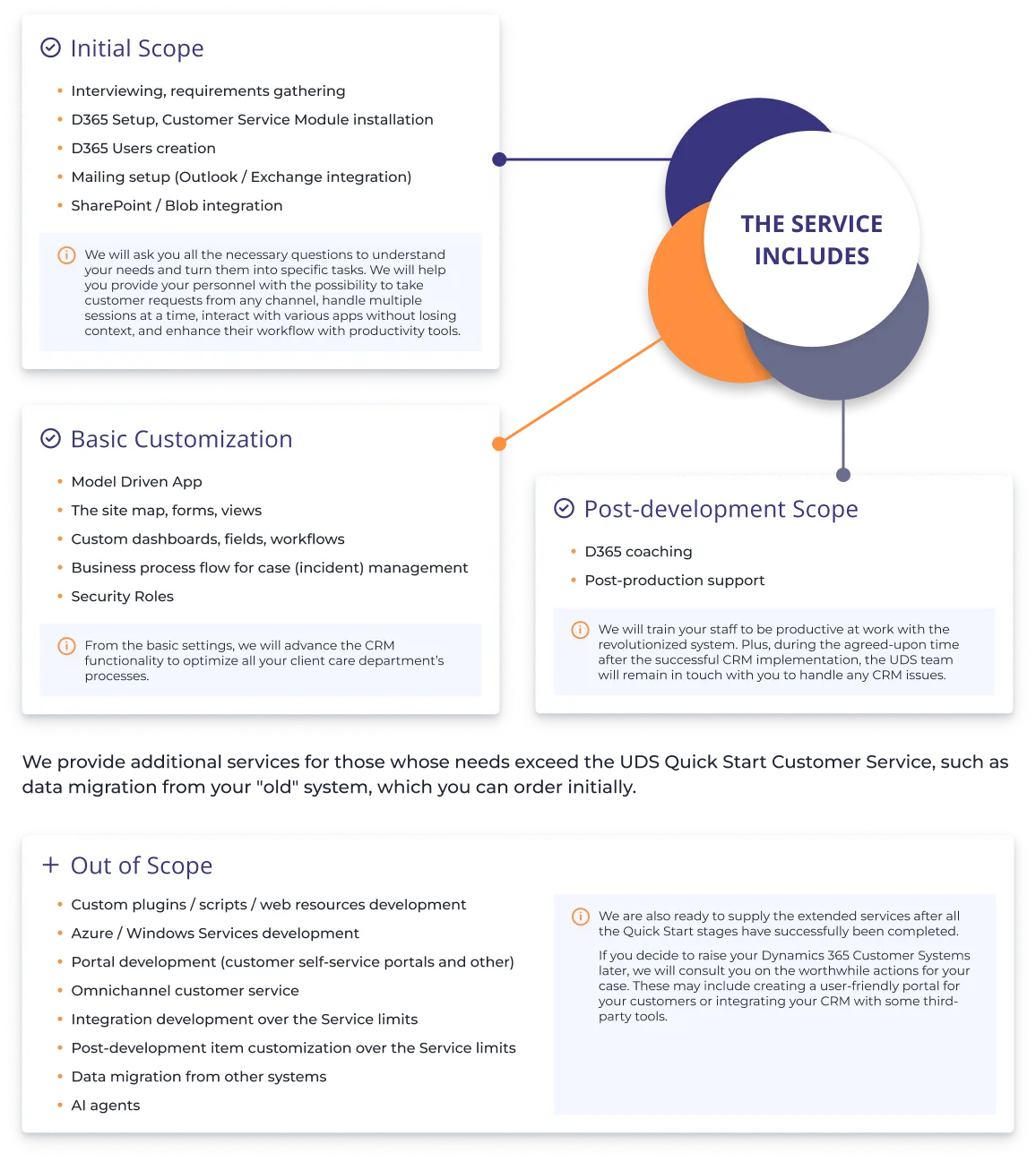
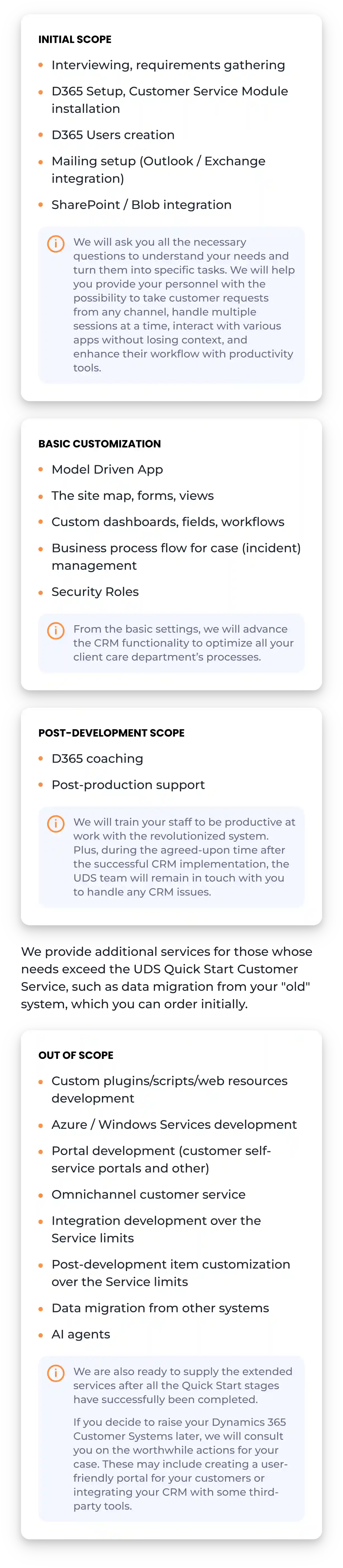
how to implement Dynamics 365 Customer Service - Quick Start service from UDSimplement Dynamics 365 Customer Service quickly - Quick Start service from UDS

The Service Roadmap

Service Roadmap of D365 Customer Service Quick Start (from Application to Support)Service Roadmap of D365 Customer Service Quick Start (from Application to Support)

Comprehensive Sales Case Study

Web Application for Car Rental Operations

Learn how the UDS team has assisted a German car service company in streamlining its processes and equipping its operators with the necessary tools to manage the fleet efficiently.

Within 3 months, the project was successfully completed, thanks in large part to the use of Agile and Scrum flexible work methods. As a result, the client received automated and optimized business workflows, including check-in, check-out, and vehicle damage monitoring, increased mobility, enabling operators to access and manage their car fleet from anywhere. This also reduced the time required for the rental car delivery and acceptance process, as well as the need for paper and manual labor.

LEARN MORE

University Student Recruitment Admission Portal and CRM System

Discover how we helped a university develop a comprehensive Student Recruitment Portal and CRM system to streamline the admission process and enhance candidate management.

Consequently, the UDS team developed a user-friendly admission portal that allows university candidates to authenticate via social media accounts, input their personal and academic information, upload supporting documents, and submit their applications. The process of managing candidates was streamlined by creating a tailored CRM system using Microsoft Dynamics 365 Sales and Dynamics 365 Customer Service modules, along with Power Apps for administrators, and integrating Power BI for data analysis and visualization.

LEARN MORE

Are You Interested?

Please fill out and submit the form for a free consultation. We will contact you as soon as possible.

Choose a convenient time and reserve a slot

or

Microsoft Dynamics 365 Customer Service. Quick Start