





A Short Overview of the Article
This guide introduces Microsoft Dynamics 365 Field Service, explaining how the module helps companies plan, schedule, deliver, and manage on-site service operations. It outlines the module’s core features, such as work order management, scheduling and dispatch, asset tracking, inventory management, and mobile tools for technicians, and shows how the Field Service components work together to improve service efficiency.
The article also highlights the key updates and enhancements introduced in Microsoft Release Waves 2025.
A Short Reference About UDS Systems
UDS Systems is an IT company that specializes in the development and implementation of Dynamics 365 modules.
We create custom software solutions and provide expert, personalized support to solve complex problems. We also offer a range of Dynamics 365 services, smart Power Platform solutions, and free Microsoft add-ons.
As a Microsoft Solutions Partner, we build long-term client relationships and guarantee successful system implementation.
Introduction
Field service matters more in 2026 than it ever has. Companies are under pressure from skilled labor shortages, aging workforces, and customers who expect faster, more transparent, and more reliable service than ever before.
At the same time, the industry has shifted away from purely reactive break-fix models toward predictive, data-driven, and AI-assisted service that prevents issues before they disrupt operations.
Dynamics 365 Field Service sits at the center of this transformation, combining intelligent scheduling, asset-centric service, mobile enablement, and deep integration with the Microsoft ecosystem to help companies deliver efficient, scalable field operations.
What Is Dynamics 365 Field Service and How Does It Work?
Dynamics 365 Field Service is Microsoft’s end-to-end platform for planning, delivering, and managing on-site service work. In simple terms, it helps companies get the right technician, with the right skills and parts, to the right place at the right time, and capture everything that happens once they arrive.
The solution addresses core field service challenges, including complex scheduling and dispatching, structured work order management, asset-based service tracking, and enabling technicians with a powerful mobile app for working online or offline. It is used daily by dispatchers coordinating workloads, technicians completing fieldwork, and service managers overseeing performance and service quality.
Unlike Dynamics 365 Customer Service, which focuses on cases and contact center interactions, Field Service is built specifically for physical, on-site work. And compared to custom-built service solutions, it offers a scalable, continuously updated platform with native automation, mobility, and AI capabilities, without the long-term maintenance burden of bespoke systems.
At the center of the solution are work orders, which capture the service work to be performed, and resources, which represent technicians, crews, and other service assets. These elements come together on the Schedule Board, where dispatchers use intelligent tools to assign and optimize work, while technicians execute jobs through the Field Service mobile app in the field.
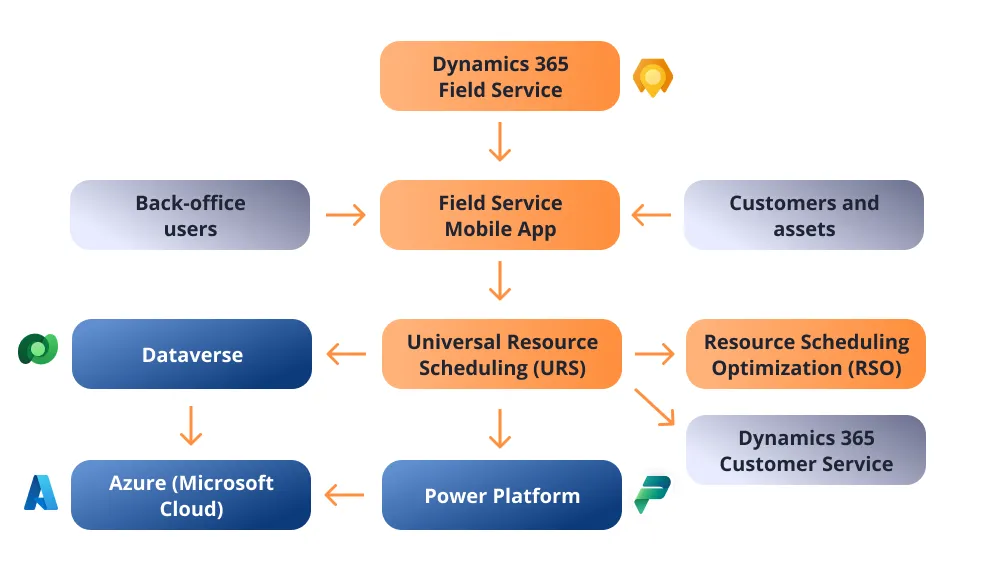
At a high level, Dynamics 365 Field Service is built on Microsoft Dataverse, which provides a shared data model, security framework, and integration layer across business applications.
Field Service also connects natively with the Power Platform, enabling companies to extend functionality with Power Automate, Power Apps, Power BI, and AI-driven insights without breaking the core system.
Basic Field Service architecture:
The Core Components of Dynamics 365 Field Service
To understand Dynamics 365 Field Service well and use it efficiently, it is important to get comfortable with a few core components that everything else builds on.
A work order represents a single piece of service work to be performed, typically moving through a lifecycle from creation and scheduling to completion and billing, with work order types and status flows defining how different kinds of jobs are handled.
Resources represent the people and things that do the work, including individual technicians, crews, and facilities, each defined by skills, roles, and availability.
Scheduling happens through bookings, which are the actual time slots where a resource is assigned to a work order, meaning a work order describes what needs to be done, while bookings define who is doing it and when, whether assigned manually by a dispatcher or automatically by the system.
Finally, assets connect service work to real-world equipment, with a clear distinction between products in your catalog and customer assets installed in the field. Maintaining asset history is critical for preventive maintenance, troubleshooting, and long-term service optimization.
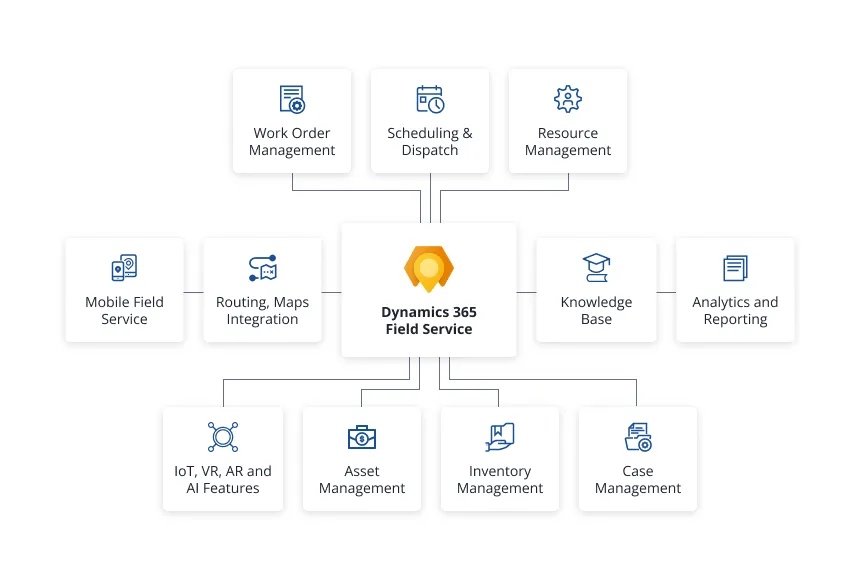
All Dynamics 365 Field Service features and capabilities are presented on the scheme:
Scheduling and Dispatching in Dynamics 365 Field Service
Scheduling and dispatching are at the heart of the Dynamics 365 Field Service module, and this is where much of its value is realized. Dispatchers work primarily in the Schedule Board, a visual, map-enabled interface that shows open work orders alongside available resources, allowing them to assign, move, and adjust bookings in real time using configurable boards, filters, territories, and business constraints.
Universal Resource Scheduling (URS) evaluates each scheduling decision by matching requirements to resources and scoring options. It focuses on real-time, rule-based scheduling and allows dispatchers to manually or semi-automatically assign resources by matching these factors, providing flexibility and control for day-to-day scheduling decisions.
For companies operating at scale, Resource Scheduling Optimization (RSO) can automate this process by continuously optimizing schedules across multiple jobs and resources, delivering the most value when volume and complexity are high. However, RSO requires clean data, clearly defined constraints, and realistic expectations to avoid over-optimization or dispatcher distrust.
It uses optimization algorithms to automatically schedule and optimize resources at a scale. It evaluates the same factors but prioritizes overall efficiency, such as minimizing travel time, balancing workloads, reducing costs, and maximizing resource utilization, making it ideal for high-volume or complex scheduling scenarios.
Both Universal Resource Scheduling (URS) and Resource Scheduling Optimization (RSO) use a common set of factors to determine the best resource for a job, including the following:
- skills and certifications
- proficiency level
- availability and capacity
- location and travel time
- work duration
- organizational unit
- required equipment or tools
- resource cost
- etc.
As a result, it helps dispatchers make faster and more informed assignments.
All in all, to take all factors into account and automate your scheduling and dispatching processes efficiently, consider our UDS solution, which assists with smart resource optimization and customizable calendar with many views.
Explore the solution here: Dynamics 365 Resource Scheduling Solution.
Field Service Mobile App: Technician Experience in 2026
The Field Service mobile app is where plans turn into real work, making the technician experience critical to success in 2026. Through the app, technicians can perform the following actions:
- view assigned work orders
- navigate to job sites
- follow service tasks
- update statuses
- access asset and customer information
And all these operations can be performed without relying on paper or back-office support.
Built for the realities of field work, the app supports offline operation, allowing technicians to continue working without connectivity and automatically syncing data when a connection is restored.
During job execution, as proof of work, technicians can do the following:
- easily capture time entries
- record product usage
- collect photos and customer signatures
Mobile adoption often fails when the app is over-customized, slow, or misaligned with how technicians work, so success depends on keeping the experience simple, reliable, and focused on reducing effort rather than adding administrative overhead.
Agreements and SLAs in Dynamics 365 Field Service
Agreements and SLAs enable businesses to deliver consistent, proactive service rather than relying on one-time work orders. They support predictable service delivery and measurable service quality for scenarios such as scheduled inspections, preventive maintenance contracts, and recurring or bundled service visits.
Agreements define recurring service commitments with customers and automatically generate work orders, bookings, and billings in accordance with established terms.
Booking setups determine how and when work is scheduled, while invoice setups control the timing and structure of customer charges.
Common scenarios include routine inspections, maintenance contracts, and bundled service visits.
SLAs define service performance expectations, such as response and resolution times, and help ensure commitments are met by tracking deadlines and service milestones on work orders.
Preventive Maintenance and AUT
Preventive Maintenance in Dynamics 365 Field Service helps companies reduce unplanned downtime, lower emergency callouts, and shift field service from reactive firefighting to planned, cost-effective operations by scheduling and performing service activities before issues occur.
Maintenance plans define recurring work, automatically generating work orders based on the following aspects:
- asset usage
- time intervals
- predefined schedules
Assets Under Agreement (AUT) link customer assets to service agreements, ensuring that the covered equipment receives the following:
- appropriate maintenance
- entitlements
- billing
Together, Preventive Maintenance and AUT support consistent asset care, improved reliability, and accurate service delivery across the asset lifecycle.
Inventory and Parts Management in the Field
Inventory and parts management is a critical part of field service, yet it is often a major pain point for companies. Dynamics 365 Field Service helps manage stock both in central warehouses and on technician trucks, ensuring the right parts are available where and when they are needed.
The system tracks stock movements and transfers between locations, while also recording product consumption directly on work orders to maintain an accurate usage history.
Despite these capabilities, common inventory challenges may involve the following:
- discrepancies between recorded and actual stock
- misplaced parts
- delayed updates from the field
Addressing these issues requires disciplined processes, real-time updates through the mobile app, and clear visibility for both dispatchers and technicians.
A good option is to use the UDS Inventory Management Tool, designed by our team specifically for easy, quick stock optimization with real-time tracking of storage and resource movements.
Moreover, it can perform as a basic module and cover the necessary nuances of your inventory operations.
Explore the Inventory Management Solution.
Automation and Power Platform
Automation in Dynamics 365 Field Service is enhanced through the Microsoft Power Platform, enabling organizations to streamline processes, reduce manual effort, and improve service efficiency.
Power Automate can be used to trigger workflows, for instance:
- work order creation
- status updates
- notifications
- approvals
Power Apps allows teams to build custom apps and extend Field Service functionality without heavy development.
Power BI provides real-time insights into operational performance and service trends. Together, these tools help organizations create scalable, low-code automation that adapts Field Service processes to their unique business needs.
Copilot and AI
Copilot and AI are what makes Dynamics 365 Field Service modern and future-ready.
In 2026, Copilot and other AI-driven capabilities take this further, providing its users with numerous capabilities, including the following:
- intelligent scheduling suggestions
- predicting resource needs
- offering technicians contextual knowledge and troubleshooting guidance in real time
- creating work order summaries
- status tracking
- defining scheduling conflicts
- analyzing capacity issues
- providing service histories
- creating service reports and follow-ups
- and more
However, while AI can greatly improve efficiency and decision-making, it is not a replacement for human judgment. Complex exceptions, customer nuances, and on-site problem-solving still require experienced technicians and dispatchers to intervene.
Reporting in Field Service
Reporting and KPIs are essential for connecting field service operations to business outcomes. D365 Field Service provides built-in reporting tools that give a quick view of performance, while Power BI integration allows for deeper analysis, interactive dashboards, and real-time insights.
Key metrics such as first-time fix rate, technician utilization, and SLA compliance, help companies measure efficiency, service quality, and customer satisfaction.
By tracking these indicators and analyzing trends, managers can identify bottlenecks, optimize schedules, improve resource allocation, and implement targeted improvements, turning raw data into actionable strategies that enhance both operational performance and customer experience.
Common Implementation Mistakes
Implementing Dynamics 365 Field Service successfully requires avoiding several common pitfalls.
One frequent mistake is treating Field Service like a standard CRM system, ignoring the unique demands of scheduling, asset management, and mobile execution. Over-customizing the solution too early can create unnecessary complexity, increase maintenance costs, and slow down adoption.
Many companies also underestimate the complexity of scheduling, especially when balancing skills, territories, and resource availability, which can lead to inefficiencies if not planned carefully.
Finally, neglecting change management and training often results in low user adoption and inconsistent processes, undermining the benefits of the system.
Addressing these challenges upfront is the key to a smooth, effective deployment.
Another good option is to turn to professionals who specialize in implementing this module, saving your team's time and effort.
Address our service Microsoft Dynamics 365 Field Service.
When Dynamics 365 Field Service is the Right Fit
Dynamics 365 Field Service is an excellent fit for companies with complex service operations that need to scale, optimize, and connect field service to the rest of the business.
It is crucial for companies across industries such as manufacturing, logistics, transportation, utilities, energy, facilities management, property management, real estate, construction, engineering, telecommunications, healthcare, medicine, and technology.
It is especially well-suited for companies already invested in Microsoft 365 and Dynamics 365, where native integration unlocks end-to-end visibility across sales, service, finance, and operations.
It is also well-suited for companies meeting these criteria:
- carry out a large volume of on-site service works and require a mobile app to optimize these operations
- need multi-resource booking
- have large technician workforces
- must consider a wide range of factors while resource distributing
- have a strong focus on preventive maintenance and a predictive approach
- want to implement AUT, AR, and VR into their business and automate the system with the help of AI
- need extensive asset tracking or want to implement asset-centric service models
For teams ready to invest in process maturity and change management, Dynamics 365 Field Service delivers long-term value through automation, insights, on-site service, and a highly extensible platform that can grow with the business.
Explore the UDS case study: Web Application for Car Rental Operations.
And contact UDS Systems to get a free consultation from our Microsoft-certified experts.
When Dynamics 365 Field Service is not the Right Fit
Dynamics 365 Field Service is a powerful solution, but it is not the right fit for every company.
If your service operations are relatively simple, highly cost-sensitive, or do not require deep integration with the broader Microsoft ecosystem, the platform’s complexity and licensing costs can outweigh its benefits.
Smaller teams may find the configuration, ongoing administration, and change management required to be more than they need, making simpler tools or basic CRM add-ons a better choice.
Field Service Future Prospects
Looking beyond 2026, the future of Field Service is increasingly shaped by AI, predictive insights, and immersive technologies. AI-driven service trends are enabling smarter scheduling, proactive issue detection, and real-time guidance for technicians, while predictive maintenance is becoming more mature, allowing companies to prevent failures before they occur rather than reacting after the fact.
Remote Assist and mixed reality tools are transforming how technicians interact with equipment, collaborate with experts, and resolve complex issues without needing on-site visits.
At the same time, forward-looking companies are treating Field Service not just as a cost center but as a revenue driver, using efficient, proactive service to improve customer satisfaction, create recurring service contracts, and unlock new business opportunities.
Subscribe to the UDS Blog to keep up to date with the latest trends and innovations.
Conclusion
Dynamics 365 Field Service offers a comprehensive platform for efficiently managing on-site work, from intelligent scheduling and mobile technician enablement to asset management, preventive maintenance, and AI-driven insights.
With the D365 Field Service module, companies can move from reactive service to a more proactive, efficient, and profitable field service operation.
Request a demo to see the system in action and consult with experienced Field Service specialists to assess how the solution can be tailored to your business needs.
Frequently Asked Questions that May Interest You
Dynamics 365 Field Service is a comprehensive platform from Microsoft for managing on-site work, combining scheduling, asset tracking, and mobile technician tools. It’s widely used in Field Service management by dispatchers, field technicians, and service managers to ensure jobs are completed efficiently, and customers are satisfied.
In Field Service 2026, scheduling is handled through the Schedule Board, where work orders are assigned to technicians based on skills, availability, and location. Universal Resource Scheduling (URS) and Resource Scheduling Optimization (RSO) help automate assignments and optimize workflows, making Microsoft Field Service a powerful tool for large or complex operations.
The Field Service mobile app gives technicians access to their work orders, schedules, customer details, and asset information directly on their mobile devices. Technicians can update job status, capture photos, collect signatures, and log time and materials in real time or offline. Changes sync automatically once the device is back online, keeping everyone up to date.
Dynamics 365 Field Service integrates natively with other Dynamics 365 apps through Microsoft Dataverse, allowing them to share the same customer, asset, product, and service data. It connects seamlessly with apps like Dynamics 365 Customer Service, Sales, Finance, and Project Operations to streamline processes from case creation and work orders to billing and reporting.
Related Content
UDS blog articles:
- Smarter Inventory Management in Dynamics 365: from Products to Accounts
- Dynamics 365 Customized Grant Management Solution
- Dynamics 365 Contact Center: the Reasons to Use it
- Dynamics 365 Sales: a Complete Guide 2025
- Dynamics 365 Customer Service: a Complete Guide 2025
Contact us and schedule a free consultation to get more details on this topic and see how UDS Systems can help your project.