





A Short Overview of the Article
In this article, we will take a close look at intelligent document processing using Microsoft AI to automate and accelerate document processing at your company.
A Short Reference About the Author
Mariia is a skilled and certified Dynamics 365 Developer with hands-on experience across Dynamics 365, Power Platform, Azure, AI, and a wide range of other Microsoft technologies.
Introduction
Manual data entry is still among the most inefficient and mistake-prone activities. Businesses process thousands of documents daily, such as invoices, contracts, ID cards, and tax forms, often manually retyping information from PDFs into databases. Microsoft’s Azure AI Document Intelligence, formerly Azure Form Recognizer, effectively copes with this challenge.
This technology goes far beyond simple text recognition: it understands the structure of a document, extracts specific data points, and integrates seamlessly with the Power Platform ecosystem.
What is Azure AI Document Intelligence?
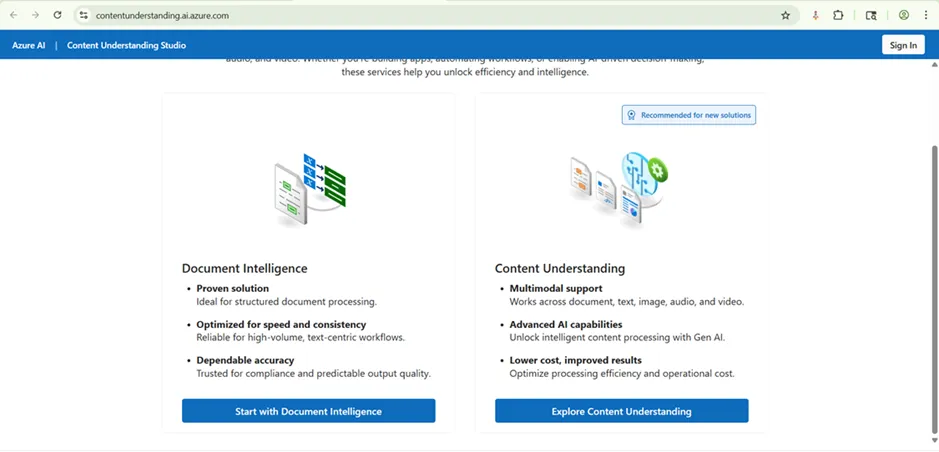
Azure AI Document Intelligence is a cloud Machine Learning service designed to extract text, tables, key-value pairs, and structural elements from documents.
Unlike traditional OCR (Optical Character Recognition), which only reads text, this AI understands context, for example, recognizing that a number next to the word “Total” is likely an invoice amount rather than a random value.
The Key Capabilities
-
Document classification
The AI can analyze a batch of mixed files and automatically sort them (e.g., distinguishing an Invoice from a Purchase Order or a Contract).
-
Data extraction
It pulls structured data such as dates, addresses, invoice numbers, and line items from tables.
-
Support for various formats
It accepts PDFs, images (JPG, PNG), and TIFF files.
-
Pre-built vs. custom model
Microsoft provides ready-to-use models for common documents (Invoices, IDs, Receipts), but you can also train a custom model on your company’s specific forms with just a few sample documents.
The Real-world Use Case: Automated Accounts Payable Flow
Let us imagine a typical scenario: a logistics company receives hundreds of vendor invoices via email every week. The problem is that an accountant opens each email, downloads the PDF, and manually types the vendor's name, date, and total amount into the ERP system.
Here is the AI solution flow:
-
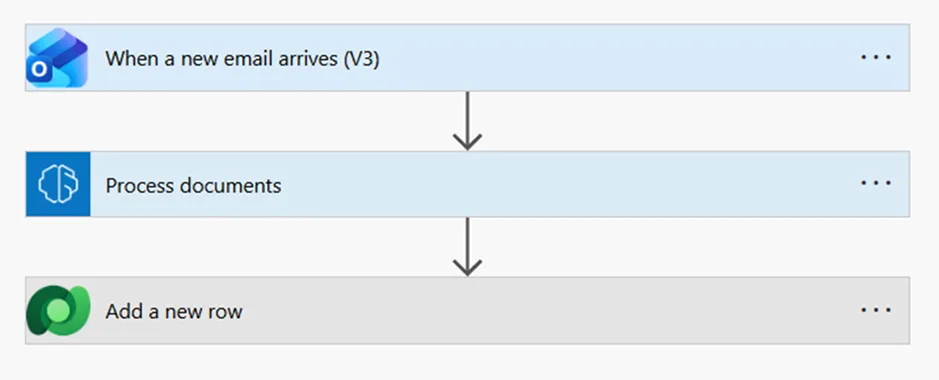
Ingestion
A vendor sends an invoice to a dedicated email address.
-
Trigger
Power Automate detects the email and grabs the attachment.
-
Processing
The file is sent to the AI Builder (Document Processing model), which classifies the document as an invoice and extracts the vendor's name, due date, and total amount.
-
Validation
If the AI’s confidence score is high (e.g., >90%), the data is automatically pushed to the database (Dataverse or SQL).
-
Exception handling
If the confidence is low, a task is created in a Power App for a human to review and verify the data.
How to Implement this Technology in Power Apps
Integrating this technology into Power Apps is straightforward thanks to AI Builder. You do not need to write a complex Python or C# code.
Step 1 Create a model.
Go to the "AI Hub" in the Power Apps maker portal. Choose the "Extract information from documents."
Step 2 Train the model.
Upload at least 5 samples of your document. Tag the fields you want to extract (e.g., "Client Name," "Order ID"). Train the model.
Step 3 Integrate.
Once published, you can use the model directly in the Canvas App.
Insert the Form Processor component from the "AI Builder" menu.
Connect it to your trained model.
Step 4 Use the data.
When a user uploads a PDF to the app, the component returns the data as properties (e.g., FormProcessor1.Fields.TotalAmount). You can then save this data directly to your CRM or database with a simple formula.
Conclusion
By using Azure AI Document Intelligence and Power Apps, companies can reduce manual data entry time by up to 80%. This process enables teams to concentrate on high-value tasks such as analysis and decision-making, instead of manually copying data from documents.
Frequently Asked Questions that May Interest You
It automatically classifies documents and extracts fields such as dates, totals, and vendor names from PDFs and images. When integrated with Power Automate and Power Apps, AI-powered document processing increases document automation, enables end-to-end document processing workflows, and significantly reduces errors and shortens processing time.
Yes, such Intelligent Document Processing can be customized using AI Builder. Businesses can train custom document models with as few as five sample documents to extract specific fields from their own forms. This allows organizations to automate document processing without writing complex code.
AI Builder is a low-code AI capability in Microsoft Power Platform that allows users to add artificial intelligence to Power Apps and Power Automate. This Microsoft Document AI enables document processing, form recognition, prediction, and text analysis using prebuilt or custom AI models without requiring data science expertise.
hey are document analysis and classification, data extraction, invoice processing automation, purchase order matching, legacy document digitalization, etc.
UDS Systems Also Recommends
UDS blog articles:
- AI-powered Document Recognition
- Training and Deploying Custom AI Models for Specific Business Application
- Dynamic AI Assistant for Invoicing
UDS case studies:
UDS services: