


 Published:October 14, 2026
 Time to read:5 min
How Much Will Your Dynamics 365 Migration Cost?
A Short Overview of the Article
A Short Reference About the Author
Introduction
What the Migration Calculator is
Why it is More Reliable Than an Estimate on Paper
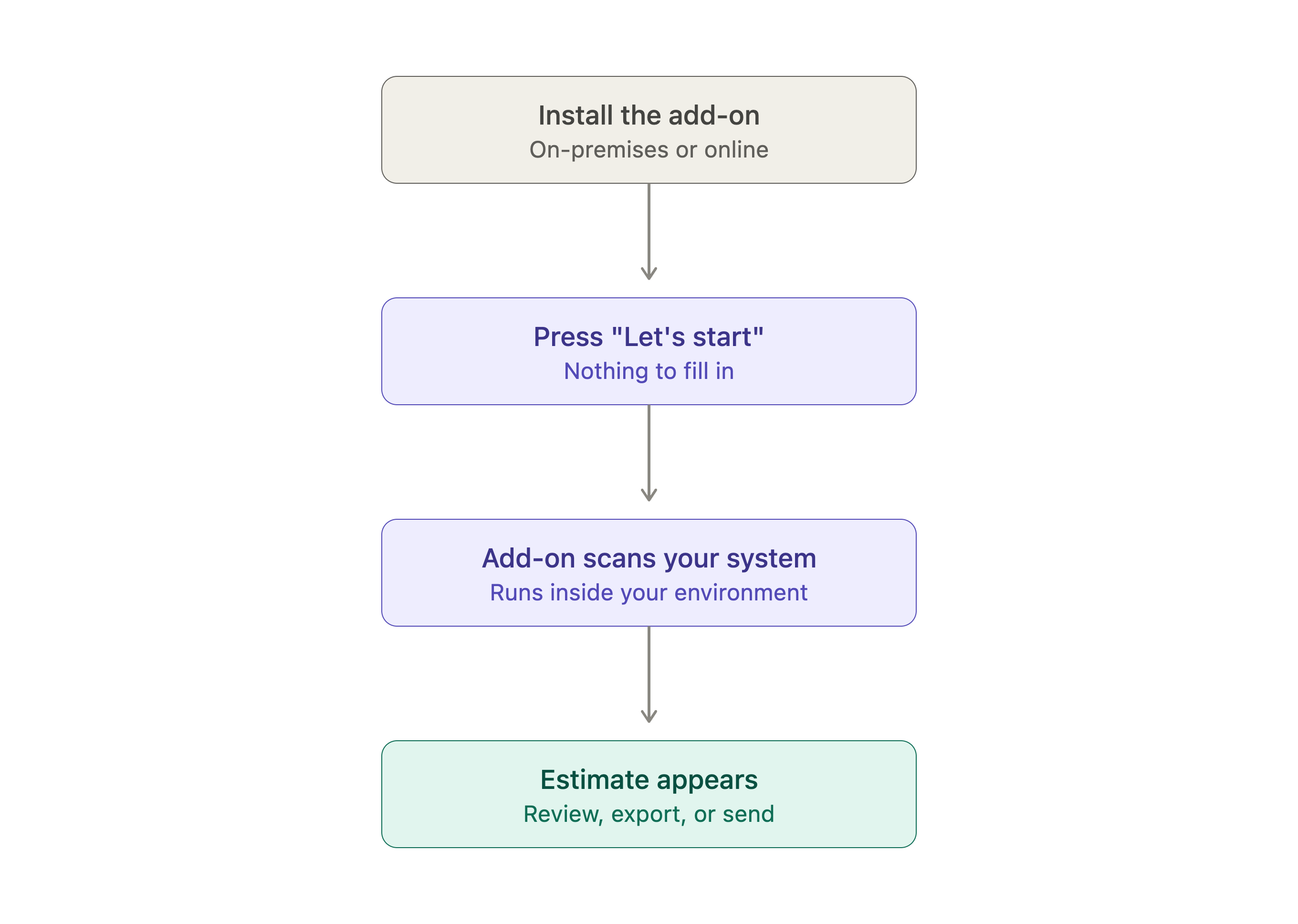
How the Calculation Runs
Only the aggregated metrics leave your environment: table names, record counts, customization counts, user counts. No record content, no customer data, no field values. The app tells you this on screen before it starts.
Because the process moves entity by entity, you can watch it happen. A progress bar fills tables are processed, and a live grid shows each entity's display name, system name, and record count as the numbers come back. On a large system, this takes upwards of ten minutes, then the app says so up front, so you can start it and go do something else.
When Something Goes Wrong
What You Get at the End
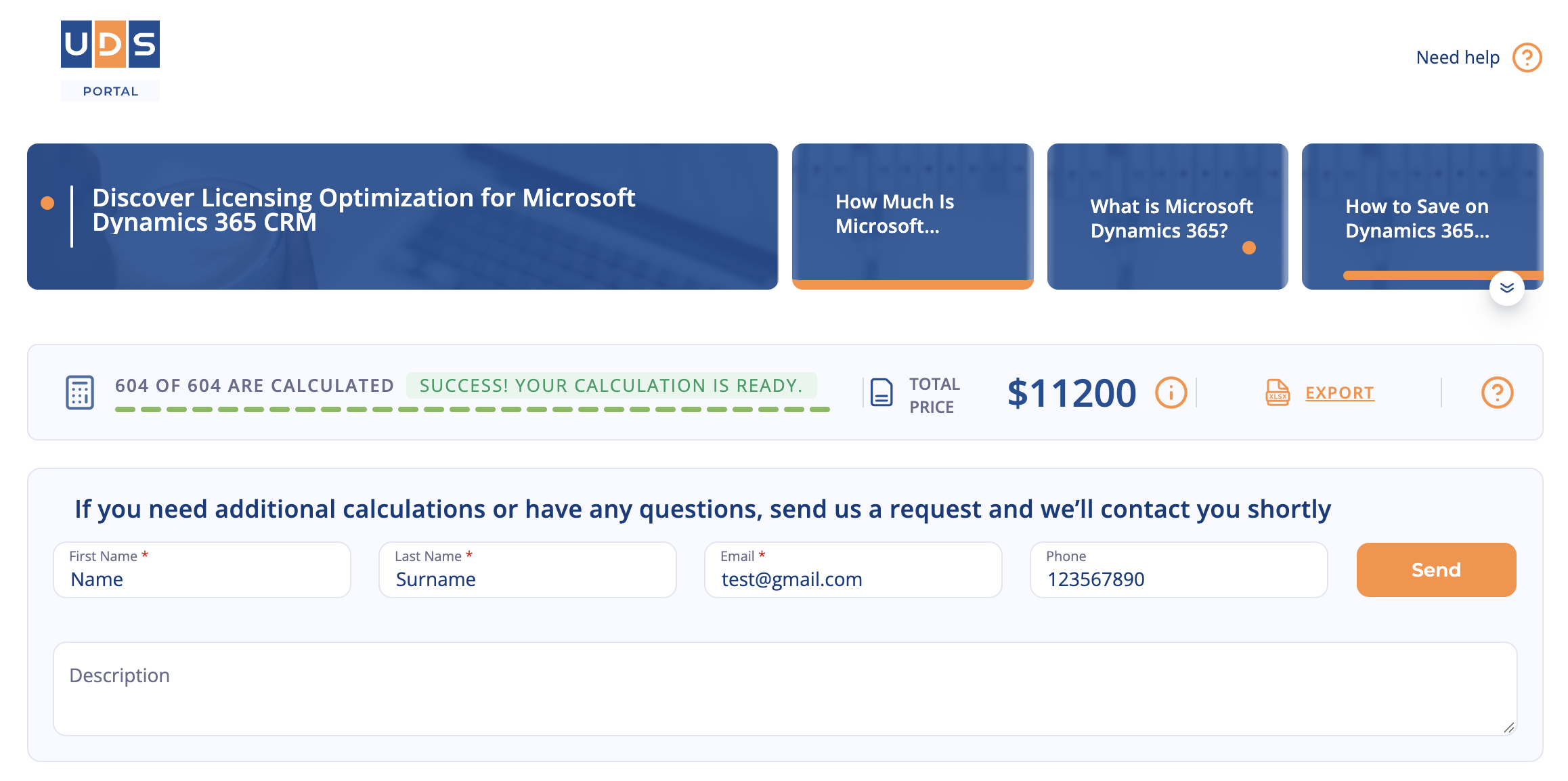
When the run completes, the price appears in the top ribbon, and the full breakdown stays on screen. From there, you can:
- Browse the entity table, which is searchable and paginated, so you can find any specific table and see its record count.
- Export the complete inventory to Excel, which is useful well beyond pricing. It is a data profile of your CRM, and a good starting point for deciding what to migrate and what to archive.
- Send the report to UDS as a short form with your contact details and attach the results to a request so a consultant can review your actual numbers rather than asking you to describe them.
What the Number Does and Does Not Cover
When it Should Be Run
Conclusion
Frequently Asked Questions that May Interest You
The estimate is always individual, as the cost depends on your current system, data volume, the presence and complexity of customizations, the number of integrations, requirements for the new system, etc. For a customized estimate, you can request a personal consultation with our Microsoft consultants.
For planning purposes, a Dynamics 365 CRM migration and implementation typically costs 20,000–100,000 euros for a small- to midsize business. However, simpler projects can cost less, and complex enterprise migrations can exceed 100,000 euros. Published implementation estimates vary depending on project scope and what services are included.
The cost of a Dynamics 365 migration depends on licensing, data complexity, customizations, integrations, implementation services, testing, and training.
Hidden costs include data cleansing, third-party tools, rebuilding legacy functionality, additional cloud resources, downtime, parallel system maintenance, ongoing support, and unexpected project delays.
To control costs, assess your existing systems, define a clear migration scope, prioritize essential features, and budget for both implementation and long-term maintenance.
For more detailed information, go to our Migration Calculator Add-on page.
Migrating everything "as-is" (lift-and-shift) is almost always cheaper and faster in the short term, but redesigning processes during migration (re-implementation) usually provides a lower total cost of ownership and higher ROI over the long term. Besides, keep in mind the following:
-
Choosing the right migration strategy
Lift-and-shift is often cheaper upfront, while re-implementation can reduce long-term costs and technical debt.
-
Migrating only essential data
Exclude obsolete records and unnecessary history to reduce migration effort and complexity.
-
Minimizing customizations
Prioritize standard Dynamics 365 functionality over custom development to lower implementation and maintenance costs.
-
Simplifying integrations
Eliminate redundant interfaces and reuse standard connectors to reduce development and support costs.
-
Cleaning data before migration
Fix duplicates and inconsistencies early to avoid costly errors and rework.
-
Automating migration and testing
Reuse migration templates and automate validation to reduce manual effort and project delays.
-
Planning the scope and cutover early
Define requirements, dependencies, and responsibilities upfront to prevent the scope creep and unexpected costs.
-
Naturally, the more data, the more complex, time-consuming, and expensive it becomes. Poor-quality data requires data cleansing and transformation, which optimizes data management but adds complexity to the overall process.
Related Content
Table of contents: