



 Published:July 3, 2026
 Time to read:5 min
Identifying and Automating Inactive Leads in Dynamics 365 CRM
A Short Overview of the Article
A Short Reference About the Author
Introduction
Requirement
Step-by-step Instructions
Let us assume you already know how to access Power Automate and select the correct environment and skip the basics and jump straight into the solution.
-
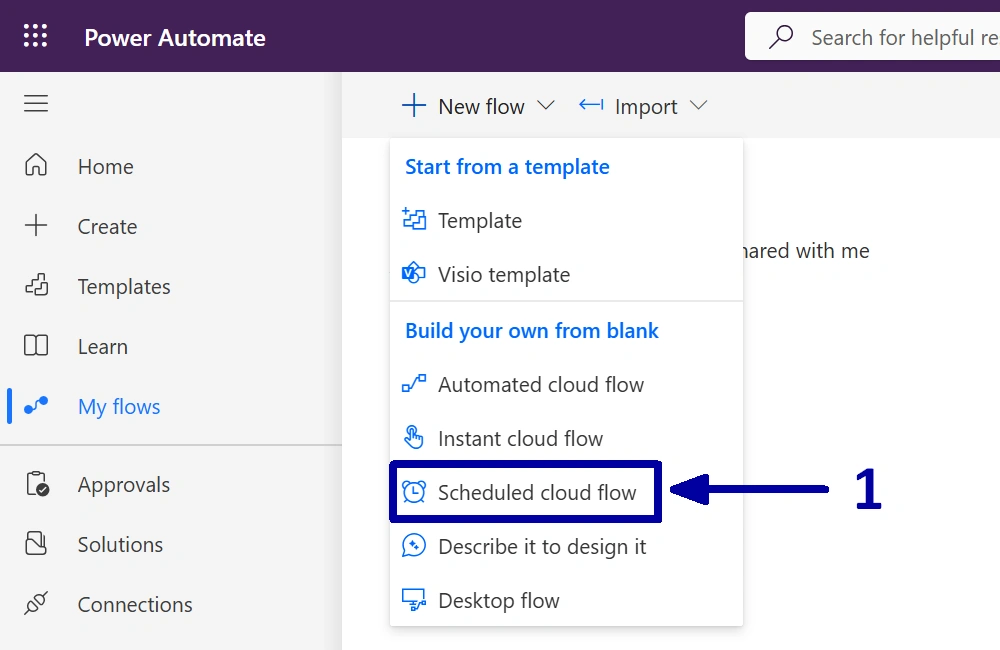
In the environment where you want to create the automation, start by creating a new “Scheduled cloud flow” (1).
-
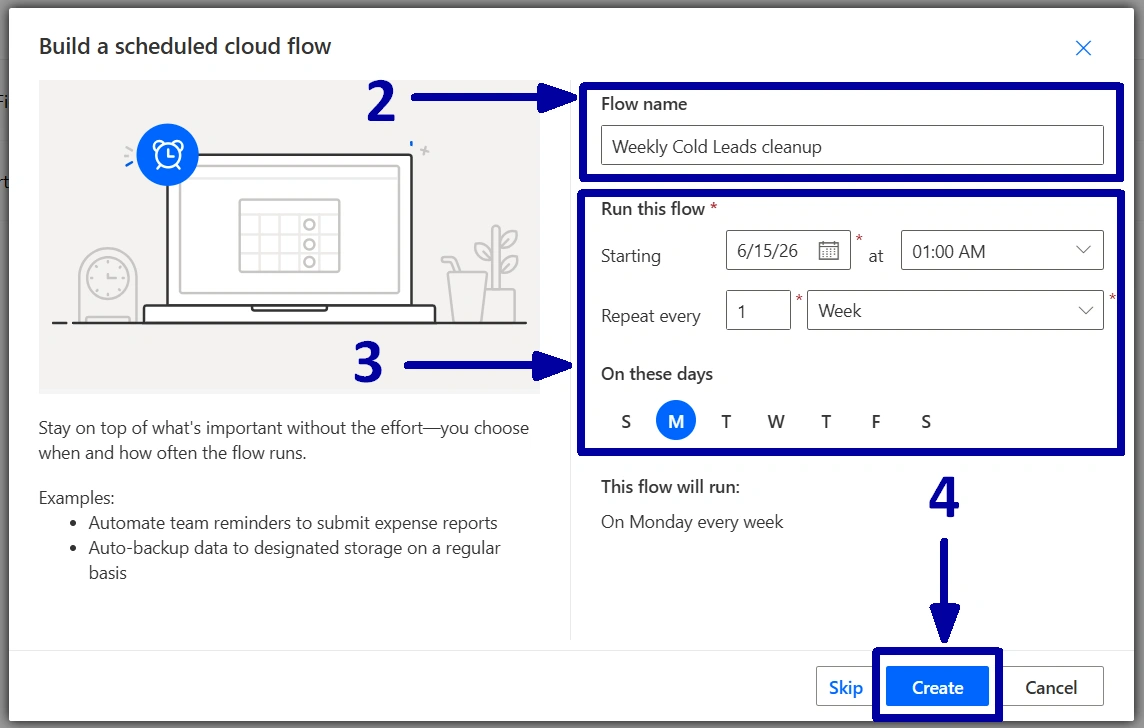
Give the flow a meaningful name (2), configure the start date, time, and recurrence interval (3), then click on the “Create” (4).
-
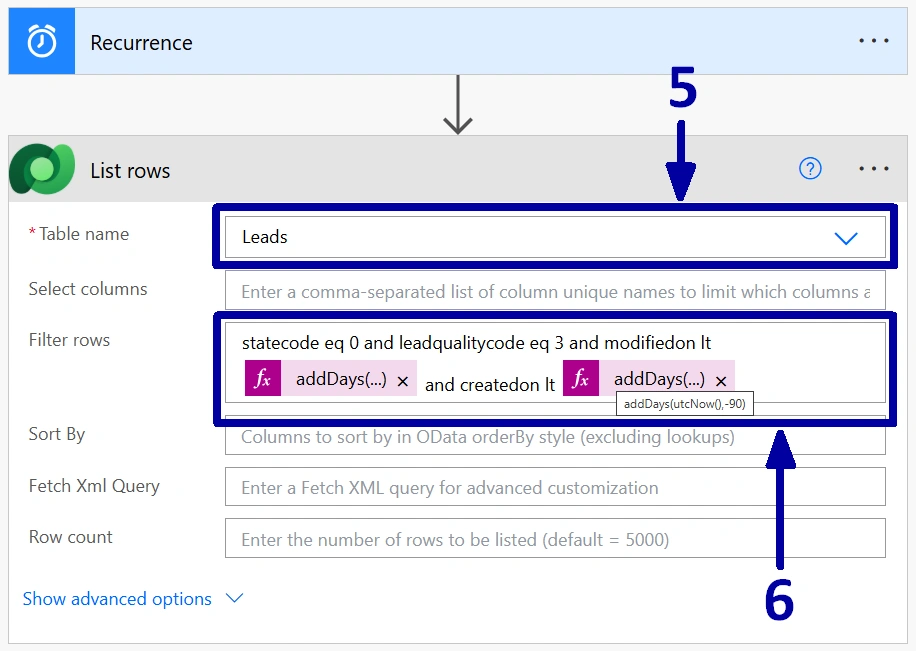
Before adding any actions, it is worth checking that the Recurrence trigger still contains the schedule configured in the previous step. Once that is confirmed, add a new "List rows” action. Since we are working with leads, select the “Leads” table in the “Table name” field (5).
There is no need to retrieve every lead in the system, so let us narrow down the results. The “Filter rows” field allows us to return only the records that match our requirements. First, we only want active leads, so add the condition “statecode eq 0”. Next, because the requirement specifically targets cold leads, add “leadqualitycode eq 3”. Finally, we need to identify the leads that were created more than three months ago and have not been updated for at least four weeks. To achieve this, add two additional conditions: one based on the “Created On” field and another based on the “Modified On” field. Combine all the conditions using the “and” operator so that only the records meeting every requirement are returned (6).
-
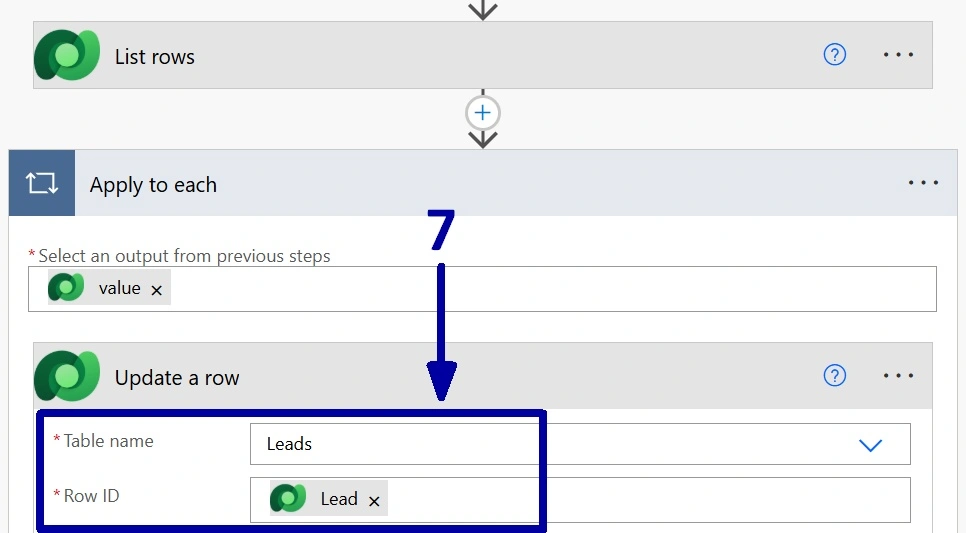
Once the filtering is in place, the only thing left is to deactivate the matching leads. Add an “Update a row” action and keep the “Table name” set to the “Leads”. For the “Row ID” field, select the “Lead” value from the previous step (7).
As soon as you add the “Lead”, Power Automate will automatically place the “Update a row" action inside an "Apply to each" container. This is expected behavior. Since the “List rows" action can return multiple leads, Power Automate needs to process each record individually and apply the update to every lead that matches the criteria.
-
In the same "Update a row" action, scroll down to the "Status" and "Status Reason" fields and select the values that should be assigned when the lead is deactivated.
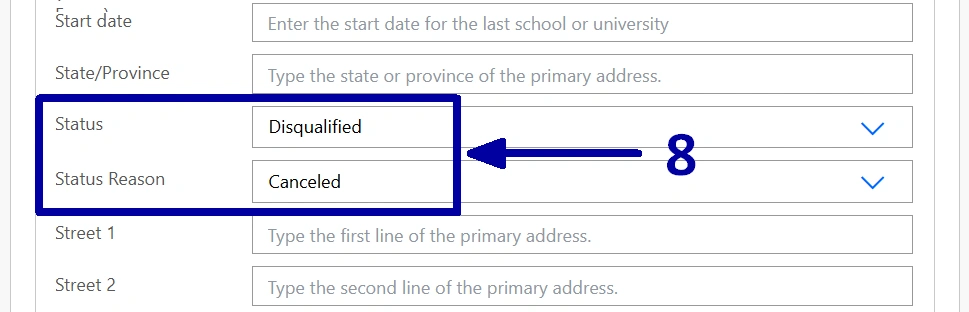
Thus, save the flow, run a quick test if needed, and then let it do the work for you. From this point on, the cleanup process will run automatically according to the schedule you configured, helping keep your lead database tidy and up-to-date.
! Note. In one of our previous articles, we looked at a solution for sending automatic follow-up reminders about forgotten leads, Managing Forgotten Leads in Dynamics 365 CRM. If your business is comfortable using the same schedule for both processes, you could combine the two automations into a single flow. One part of the flow could notify managers about inactive leads, while another part could automatically deactivate the records that have exceeded the agreed inactivity period.
Conclusion
Frequently Asked Questions that May Interest You
Deactivating leads preserves historical sales data while removing inactive records from day-to-day views and reports. This allows organizations to maintain an audit trail, analyze past sales activity, and comply with data retention policies without cluttering the active pipeline.
Yes. The filter can be adjusted to match your company's requirements. For example, you can use a different lead quality, extend or shorten the inactivity period, exclude specific lead sources, or apply additional conditions such as owner, business unit, or territory.
The flow evaluates the conditions each time it runs. If a lead has been modified within the defined period or no longer meets the filter criteria, it will not be deactivated. This ensures that only leads that satisfy all configured conditions are processed.
Yes. The same pattern can be applied to other Dataverse tables, such as opportunities, cases, contacts, or custom entities. By changing the table and filter conditions, you can automate the cleanup or status updates of many different types of records using the same Power Automate approach.
Related Content
Table of contents: