




A Short Overview of the Article
In this article, we will tell you in detail about how our team built a single, reusable, scalable document generation engine that produces business-critical PDF documents, such as reports, forms, and multi-page packages, directly from the CRM data.
A Short Reference About the Author
Andrii is a certified and highly skilled Dynamics 365 Developer with hands-on experience across Dynamics 365, Power Platform, Azure, AI, and a wide range of Microsoft technologies.
Introduction
As part of a long-term platform initiative on Microsoft Dynamics 365, our team built a scalable document generation engine that produces business-critical PDF documents: reports, forms, and multi-page packages, directly from the CRM data.
The goal was a single, reusable mechanism flexible enough to handle any combination of static and dynamic content, any data volume, and any layout, while keeping development and rollout of the new document types fast.
The Challenge
Companies regularly need to generate complex, multi-page PDF documents from records stored in Dynamics 365 - combining structured data, repeatable sections, user-added notes, and pages sourced from more than one place. The requirements were:
-
Support for both PDF and HTML-based templates
-
Dynamic content rendering that adapts to the amount and shape of the underlying data
-
User-added notes, comments, and annotations layered on top of generated content
-
Merging pages and documents from multiple sources into a single output
-
Fast rollout of new document templates with minimal manual layout work
Architecture at a Glance
The solution is built as a distributed architecture spanning Dynamics 365 and Azure:
-
Dynamics 365 plugins orchestrate the generation process and prepare the underlying data
-
A custom Azure API provides the processing core that assembles, renders, and merges documents on demand, built for asynchronous, scalable workloads
-
A template repository offers versioned HTML and PDF templates that can be updated without code changes
-
An online HTML editor lets end users add their own notes, comments, and explanations directly into the generated output
These pieces form a single API capable of handling any combination of HTML and PDF content, and of pulling and combining pages from different sources, Dataverse records and Azure-hosted storage alike, into one coherent document.
Three Ways to Generate a Document
Depending on how fixed or variable a document's layout needs to be, the platform supports three generation strategies. Each option involves a different balance between flexibility and delivery speed.
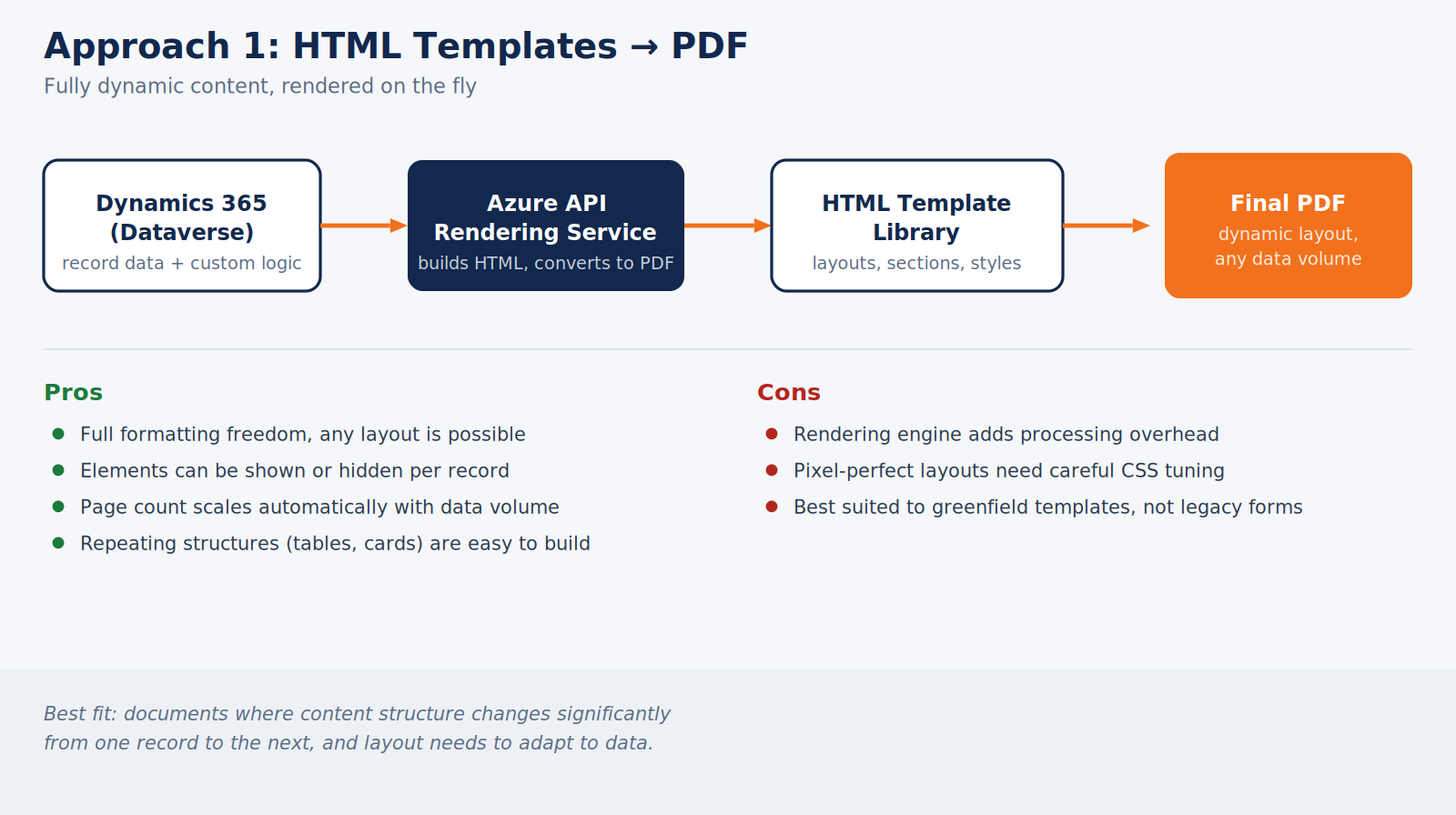
1. HTML Templates → PDF
It is used when maximum flexibility is required, and the content structure varies significantly from one record to the next.
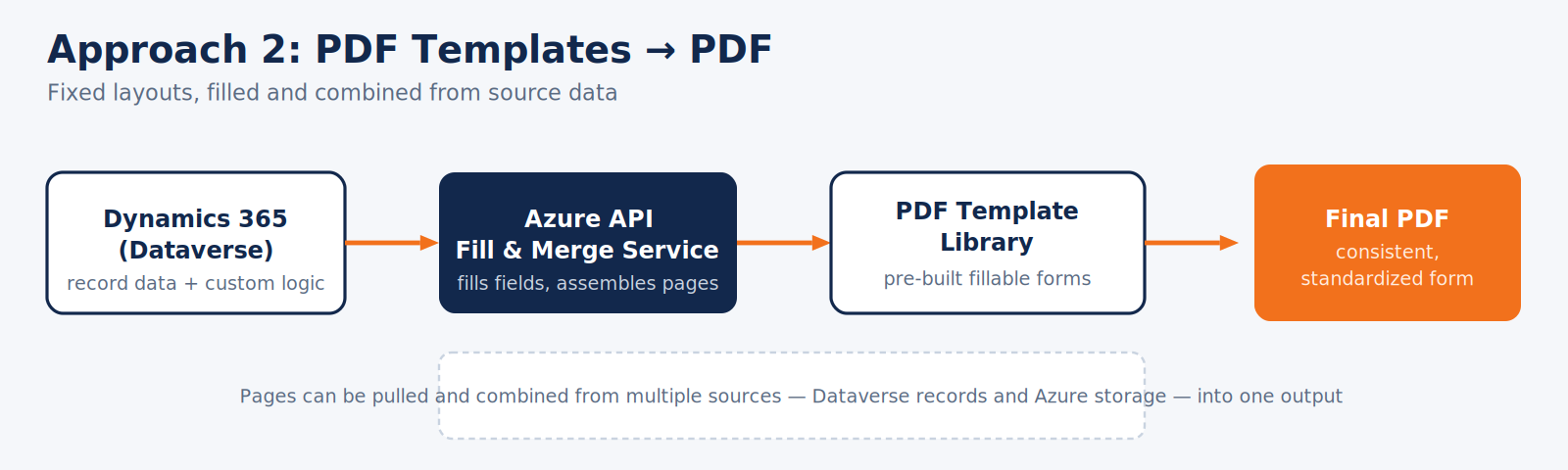
2. PDF Templates → PDF
It is used for standardized, fixed-layout documents built from pre-designed PDF forms. This approach cuts new-template development time in half compared to building every layout from scratch and allows pages from different sources to be combined into a single deliverable.
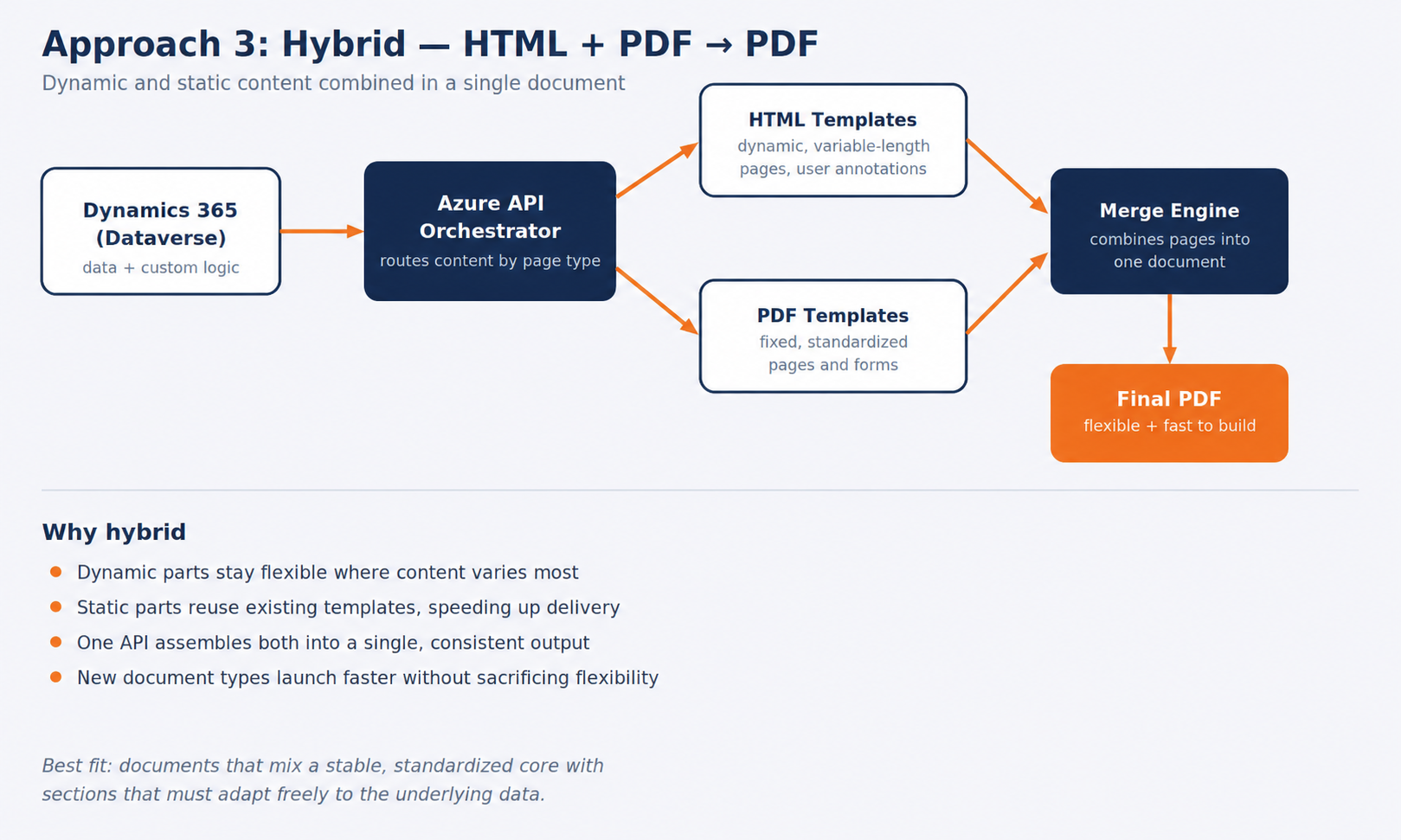
3. Hybrid Approach: HTML + PDF → PDF
This is the most powerful and universal option, used when part of a document must stay dynamic and adaptable while another part is static and needs to be rolled out quickly. HTML pages provide dynamic structure, hiding or expanding sections based on data. PDF pages provide stability and speed. The API merges both into a single final document.
Conclusion
Thus, as we can see, the hybrid, template-driven architecture delivered measurable outcomes:
- Time to roll out new document templates reduced by at least 2x
- Fewer layout- and formatting-related errors in generated documents
- End users can add their own notes and comments directly into generated output
- A scalable, resilient service that handles growing document volumes without redesign
- Support for new document types has become significantly simpler to add
The resulting API supports any combination of HTML and PDF templates, making it a reusable, future-proof foundation for document generation across the platform, well beyond the specific use case it was first built for.
Frequently Asked Questions
The platform can generate business-critical PDF documents such as reports, forms, and multi-page document packages. It supports HTML templates, PDF templates, and hybrid documents that combine HTML and PDF content into a single output.
HTML templates can dynamically adapt to the underlying CRM data. Sections can expand, repeat, or be hidden depending on the amount and structure of the data, making the solution suitable for both simple and highly variable documents.
Yes. An online HTML editor allows end users to add notes, comments, explanations, and annotations directly to the generated content before the final document is produced.
The hybrid approach combines the flexibility of HTML with the stability and speed of pre-designed PDF pages. This allows dynamic sections to adapt to CRM data while standardized pages can be reused, and content from multiple sources can be merged into one coherent PDF. This also helps reduce development time when introducing new document templates.
Related Content
UDS Blog articles: