


AI-enabled Software Delivery for an Automotive Project
 Dynamics 365
 Azure Services
 Visual Studio
 Copilot Studio
Geography
Germany
Industry
Automotive
Size
200+ employees
Implementation
2026
A Short Reference about the UDS Expertise in AI
We help our clients with such popular use cases:
- AI-accelerated Dynamics 365 implementation
- AI assisting Dynamics 365 developers, supporting Power Platform development, and improving code quality
- AI-automated document management, invoicing, product management, etc. (according to the actual client’s needs and requests)
- AI-automated Dynamics 365 testing, DevOps, and deployment
A Short Reference about the Project Team

The project team specializes in Dynamics 365 Customer Engagement, Azure, Copilot, and Visual Studio. Having successfully delivered numerous projects across the DACH market, they provide innovative solutions tailored to the client's unique business requirements.
Client’s Request

The team develops an automotive platform across frontend, backend, API, Dynamics 365, Azure Functions, and QA. A single work item can cross several of these areas. The requirements live in Azure DevOps, while the implementation and technical guidance live in GitHub.
Therefore, the team needed AI assistance that could use this project context and support developers through the entire task.
Briefing
Thus, the project team’s task was to give developers one entry point for AI-assisted delivery. A Copilot orchestrator would interpret the task, involve the relevant specialist agents, retrieve context from project systems, and return work for human review. The same model was needed to support both a proposed pull request and local implementation in Visual Studio Code.
Preparation
Each platform was assigned a clear role before agent-based delivery was introduced:
-
Azure DevOps as the source of truth:
Work items, acceptance criteria, priorities, and wiki documentation remain in Azure DevOps. The AI Work Item Assistant and Azure DevOps MCP make this information available for task clarification and implementation planning.
-
GitHub Enterprise as the execution platform:
Repositories, branches, pull requests, Copilot instructions, agent definitions, and reusable Skills are maintained in GitHub Enterprise. This keeps AI guidance close to the code and its change history.
-
Visual Studio Code developer setup:
Team onboarding manuals cover GitHub Enterprise authentication, GitHub Copilot, Azure DevOps MCP, GitHub MCP, and the Dynamics 365 agent with Dataverse MCP. This gives developers a consistent local starting point.
-
Project instructions and reusable Skills:
Repository instructions describe architecture, coding conventions, configuration, testing, and common pitfalls. Skills package repeatable workflows such as onboarding, work-item analysis, CRM access, security review, and environment checks.
-
MCP context layer:
Dataverse, GitHub Enterprise, Azure DevOps, Figma, and Playwright MCP integrations provide the data different agents need, including CRM records, code, requirements, designs, and browser-validation context.
Realization
- 1.
Task intake and preparation
A PO, UX specialist, or another project participant creates the work item in Azure DevOps. The task, acceptance criteria, and linked documentation form the initial request. The AI Work Item Assistant can improve the description and prepare the task for agent execution.
- 2.
Central orchestration
The Default Copilot Agent acts as the central orchestrator. It parses the request, identifies the affected technical areas, selects the required agents, coordinates their work, and combines the results into one consistent response.
- 3.
Specialized development agents
Seven domain agents were defined for mobile, frontend, backend, API, Dynamics 365, Azure Functions, and QA. Each agent contains role-specific responsibilities, expected outputs, and relevant project tools. Several agents can contribute when one task crosses application layers.
- 4.
Context retrieval through MCP
Agents retrieve current context instead of relying only on prompt text:
- GitHub Enterprise MCP provides repositories and pull-request history.
- Azure DevOps MCP provides tasks and acceptance criteria.
- Dataverse MCP provides CRM entities and relationships.
- Figma MCP provides UI designs.
- Playwright MCP supports browser automation and end-to-end validation.
- 5.
Pull-request execution path
For a well-bounded task, the agent flow can generate a ready pull request in GitHub Enterprise. The developer reviews the proposed code, checks the implementation against the work item, and approves or declines the change.
- 6.
Local VS Code execution path
For complex tasks or work requiring debugging, the agent suggests or applies changes locally in Visual Studio Code. The developer investigates the result, runs validation, adjusts the implementation, and then commits and pushes the approved code.
- 7.
GitHub Enterprise delivery control
GitHub Enterprise hosts the repositories, agent assets, instructions, branches, pull requests, and change history. It is the common execution environment that connects Copilot and the project codebase.
- 8.
Traceability and continuous improvement
Azure DevOps work items can record primary and secondary AI usage, while GitHub Copilot data provides platform-level adoption information. These sources help the team identify frequently used scenarios and improve instructions, Skills, and agent workflows. The final code decisions remain with the developer.
The Key Features
Project-aware assistance
Copilot receives repository rules and task-specific procedures rather than relying only on a developer’s prompt.

Connected delivery context
Configured MCP access lets agents consult relevant project systems during investigation and implementation.

Coordinated specialist work
The orchestrator can bring together the roles needed for changes across the application layers.
Traceable, reviewed output
AI-assisted work is recorded on the task. The proposed code still passes through the developer’s review.

Visualization
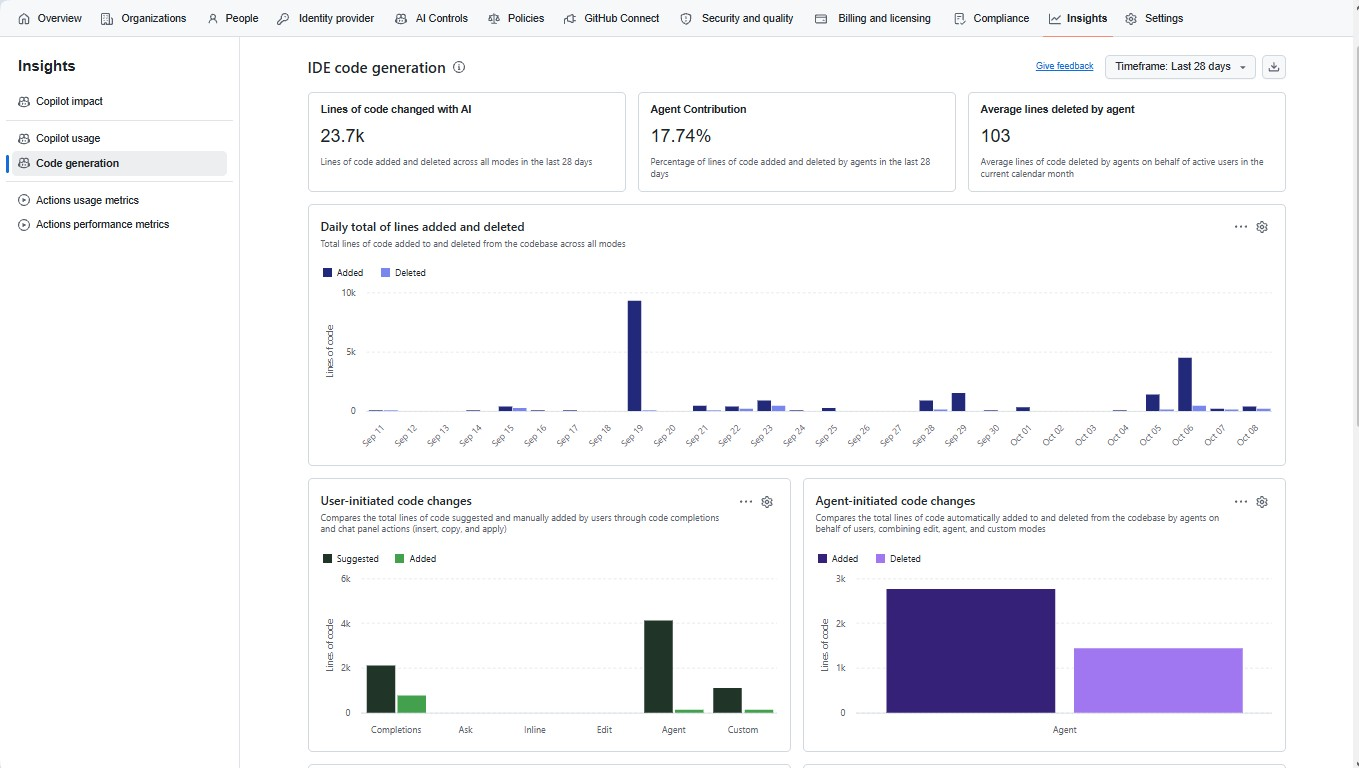
What the Customer Received
The final results demonstrate the team's high efficiency during the project.
! Note. The developer’s review remains at the control point before a proposed change reaches the product.
Copilot can use repository guidance and project knowledge to support work on the actual codebase.
Agent definitions organize assistance for frontend, backend, API, CRM, Azure Functions, mobile, and QA.
The Skills make recurring investigation, onboarding, DevOps, and review activities easier to repeat.
Work-item fields record the types of AI assistance used, giving the team a basis for delivery analysis.
Summary
The German automotive project has established a structured AI-enabled delivery ecosystem integrating Azure DevOps, GitHub Enterprise, GitHub Copilot, VS Code, specialized agents, reusable Skills, and MCP integrations. Azure DevOps manages requirements and acceptance criteria, while GitHub Enterprise hosts code, instructions, agent assets, pull requests, and change history.
The central Copilot orchestrator coordinates specialist agents across development and QA, using the project context to support pull-request or local VS Code workflows.
Reusable project knowledge, developer-reviewed changes, and AI usage tracking enable consistent, traceable delivery and continuous improvement while maintaining human control.
Some Materials that May Interest You
- AI Assistance Service
- Microsoft AI cases
-
Blog articles about AI development with Power Platform, Copilot, and Azure AI
If you need more information about AI infrastructure or free consultation with professional AI assistance, feel free to contact our UDS Systems team.