


 Azure Services
 Open AIAzure ServicesOpen AI
Geography
Germany
Industry
Automotive
Size
200+ employees
Implementation
2025

The project team consisted of experts in Dynamics 365, Power Platform, Azure, and AI. They specialize in building smart AI assistants for customer support and applied best practices in generative AI to this project.

A German automotive company asked UDS to help automate their invoice processing. The goal was to:

The client’s accounting team receives numerous invoices daily from various suppliers (over 800 per month) in the form of PDF documents, scans, or photos (typically in the form of images of physical invoices printed on paper). Each invoice differs in format and content.
The main challenge is the lack of a unified layout, as incoming invoices vary in structure, format (including scans and photos in formats such as PDF, JPG, PNG, etc.), and data content. The data from all these invoices needs to be entered into the CRM, i.e., creating invoice records, separating them, filling in the data into appropriate fields, and indicating the necessary account ledger numbers. Filling this data out manually takes a lot of time.
Manual processing takes 8–12 minutes per invoice and often leads to:
To address these challenges, we developed a smart AI assistant. Our solution was designed to automate the process of recognizing incoming invoices, extracting data from PDFs and images, and distributing this data to the relevant fields in the CRM records. Additionally, it automated the creation of split entries for each incoming invoice and associated them with the appropriate general ledger account numbers.
The application recognizes and extracts data from invoices of varying formats and layouts. The application is trained on a dataset encompassing diverse invoice formats to ensure it can recognize a wide variety of invoices. Data extraction achieves an accuracy rate of 85% or higher, requiring minimal manual corrections from the accounting team.
It uses OCR (Optical Character Recognition) and AI to convert a document, image, or scan to text, extract required fields, identify data (such as numbers, symbols, specific fields), and understand the context (e.g., "this is an invoice number").
It is fully integrated with Dynamics 365 CRM. The integration with the ERP system is also possible.
The required entries are automatically created. Extracted data is mapped and populated into the corresponding fields in the records in the CRM. Besides, the original invoices are also uploaded to the record.
It also supports duplicate checking, which AI and business logic rules detect automatically.
The matching model utilizes predefined mappings, historical invoice data, and user feedback to continuously improve its accuracy and logic over time.
This model is unique in its ability to self-train. It uses an API to update account mappings based on user input (requires a small database and adds minimal cost).
Continuing improvement helps the users to recognize and deal with more invoice types and constantly decreases input errors.
The final goal is the following: the accountants are required to only confirm data and make fewer than 1% corrections with automatic recording of discrepancies.
For a more comprehensive understanding, refer to the Dynamic AI Assistant for Invoicing article in the UDS Blog.

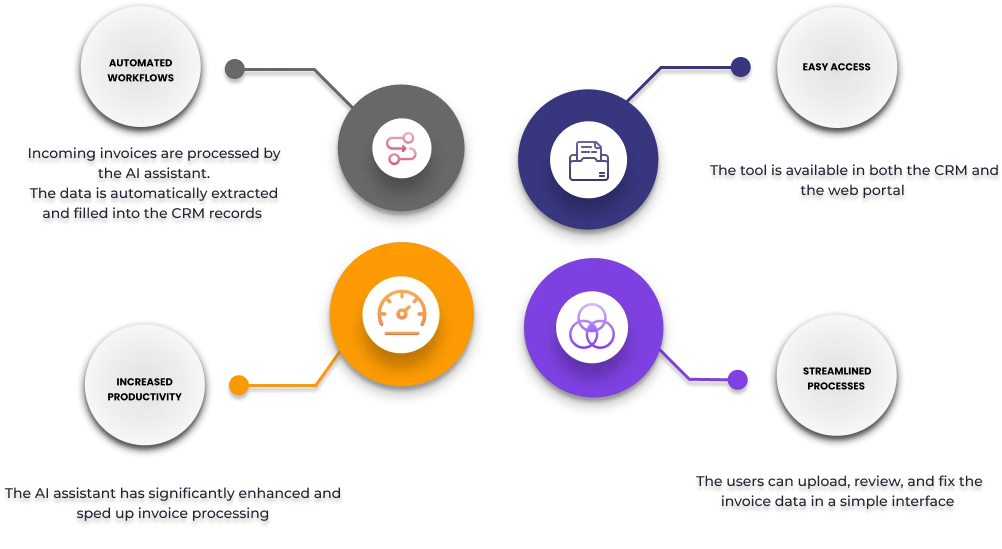
The AI assistant now recognizes invoice data, fills in the CRM info in the relevant fields, and learns from user corrections. Besides, the assistant is accessible both from the CRM and the web portal.
Users can upload invoices and review extracted data through an intuitive and user-friendly interface. The data is updated online immediately after the users have rechecked the incoming documents. It loads within 5-10 seconds and operates 24/7, processing individual invoices with stable speed and reliability.
Automated invoice processing does not have limits and can take just about 1 minute. Employee involvement is minimized: they are required to verify data and provide final confirmation in the system for further payment processing.
Moreover, we have provided the client with these benefits:
Therefore, routine tasks previously performed by people, such as document entry, primary processing, or data conversion, can be automated and optimized, thereby avoiding a lengthy process of delivering changes to AI assistant instructions.