





A Short Overview of the Article
This article provides a detailed overview of the latest improvements to the License Calculator, focusing on the user interface redesigns, performance enhancements, and new reporting features that save time and effort.
A Short Reference About the Author
Vlad is a qualified Dynamics 365 Consultant and Project Manager who oversees a broad array of complex tasks, including Microsoft licensing and business process customization.
Introduction
Licensing in Dynamics 365 is one of the topics that nobody gets excited about until the renewal invoice arrives. Companies often assume that licensing decisions are something to review once a year, usually under pressure and with very limited time. However, there are different license types, roles, pricing levels, and a licensing guide that can easily run to dozens of pages.
As a result, companies either overspend on licenses they do not fully use or risk compliance issues because it is difficult to know which features are consumed by which teams.
The License Calculator has already proven its value in helping companies understand Dynamics 365 license usage and optimize the costs. It analyses how users interact with Dynamics 365, checking which features and modules each person accesses, and compares that with available license capabilities. Moreover, it now works even more effectively, as we have improved how users interact with it.
What We Have Improved in the User Interface
When dealing with complex licensing models, clarity is everything. One of the main areas of improvement is the user interface.
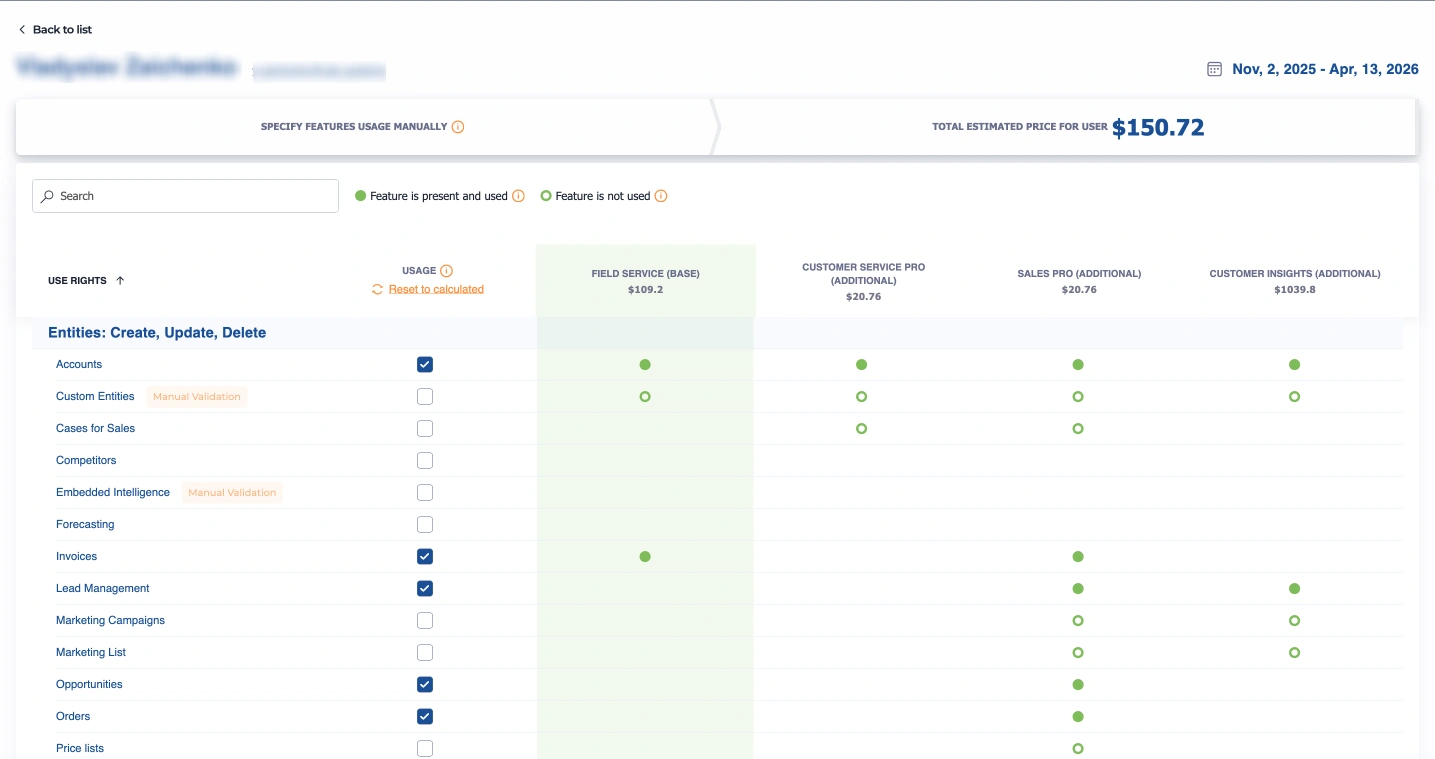
We have redesigned the key screens to make the data easier to read and interpret. Instead of guessing which license a team needs, administrators will now see a clear recommendation displayed in a simple visual format.
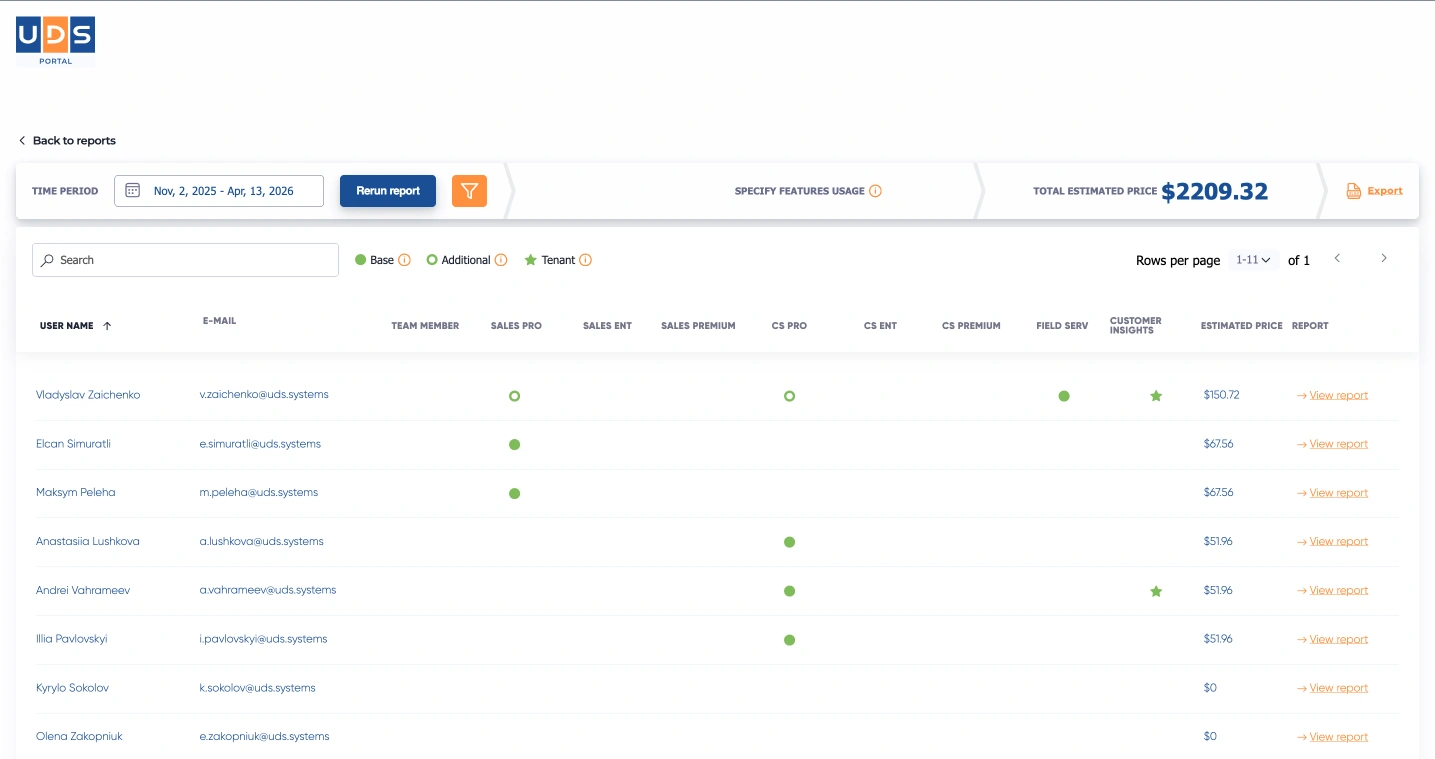
Now, for each user, you can easily see what they use, whether their current license aligns with their usage, and the cost impact of changing their plan. The goal is simple: less time figuring out what you are looking at and more time making decisions based on the results. Finance teams will appreciate straightforward transparency, while IT teams can rely on automated visual data to avoid manually digging through logs.
Precision Analysis with New Filtering Capabilities
Another significant addition to the License Calculator is the ability to calculate licenses based on selected filters. Previously, analyzing usage meant processing the entire environment. Now, users have more control, with the ability to filter data by username or domain.
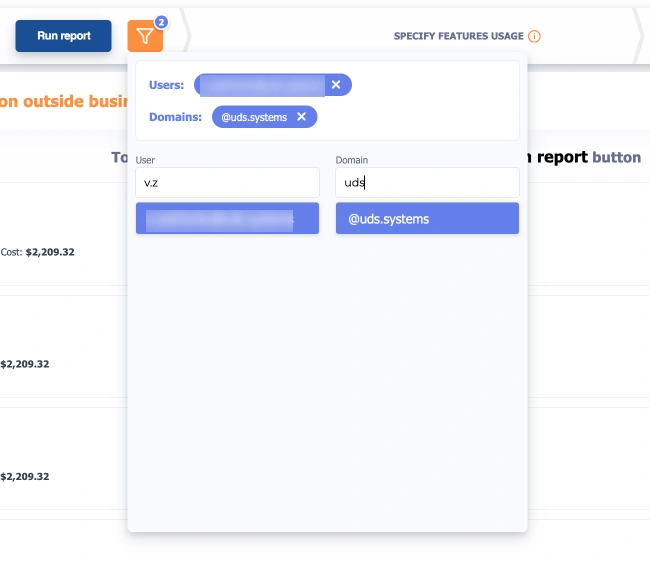
This means that if a user only wants to review the license consumption of a specific department (by isolating their unique domain), audit external users, or check a single individual's activity, you can do so effortlessly. This targeted approach not only saves time but also provides highly specific insights exactly where you need them, without the clutter of irrelevant organizational data.
How Performance Optimization Speeds Up the User’s Work
Alongside visual clarity, performance is another big focus. As environments grow and user activity increases, tracking license consumption requires analyzing massive amounts of data. The calculation process has now been optimized to run large datasets faster.
This provides quicker results, especially for environments with many users and long activity periods. Instead of waiting for calculations to complete, users will be able to get insights sooner and move on with their work. This rapid processing enables real-time analysis, allowing you to run various “what-if” scenarios instantly to see how different setups would affect your overall budget.
Why Saving Reports Matters for Real Workflows
Continuity and collaboration are essential when planning software budgets. We have also added the ability to save calculation reports. This allows the users to review results later, compare different periods, or share findings internally without having to recalculate everything from scratch.
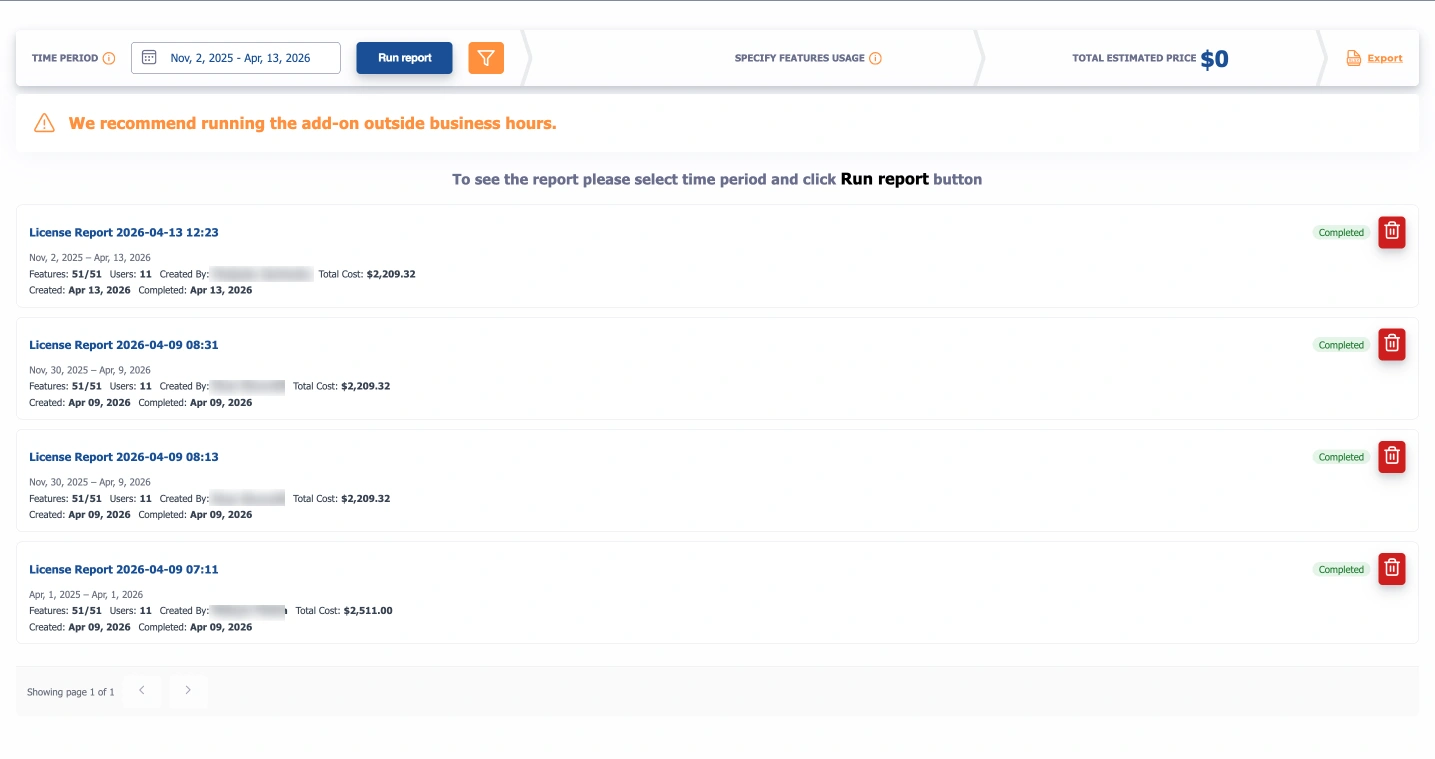
Whether you are preparing for an annual renewal, restructuring departments, or simply conducting a routine audit of unused licenses, having a history of saved changes is incredibly helpful.
Users can now track changes over time and generate clear, exportable reports for stakeholders. It is a small change that makes the tool much more practical for real business workflows.
Accordance to the Latest Microsoft Licensing Updates
As always, these new features and improvements work in tandem with the most current Microsoft licensing rules. Microsoft frequently updates its licensing guides, including revised license types and feature mapping. The tool automatically reflects these updates, ensuring that your faster, clearer reports are always based on the latest available data and pricing structures.
The Problems You Can Solve with Our License Calculator
There are a few typical problems you can conveniently solve with the calculator:
-
Actual license usage auditing
You can get insights on license usage per user, product, and department.
-
License usage vs. assignment comparison
You can compare assigned licenses with actual usage to identify discrepancies.
-
Accurate licensing costs calculation
You can ensure you have a clear view of your Microsoft licensing expenses.
-
Dynamics 365 licensing calculation
You can efficiently calculate costs for various Dynamics 365 modules, including Dynamics 365 Customer Engagement (CE).
-
Forecasting budget
You can accurately plan your Microsoft licensing budget for the upcoming periods.
-
Expense reduction
You can identify underused or overused licenses and switch to more cost-effective options to save money.
Why You Need the License Calculator
Are you planning to update your Microsoft licenses but unsure which ones you need to purchase for the next period? You have two options:
-
Manually collect statistics on Dynamics 365 usage
-
Navigate a complex Microsoft Licensing Guide (over 60 pages)
This Microsoft-certified add-on analyzes feature usage by each Dynamics 365 user during a specified date range, functioning as a Microsoft cost calculator tailored to various product types including Dynamics 365 Sales, Marketing, Customer Service, Field Service, Power Apps, Microsoft Copilot, Microsoft AI, Azure, and Microsoft 365 (Office 365) licenses.
How the UDS License Calculator Works
One of the vital advantages of our add-on is its user-friendly design. Here is how it operates in just a few clicks:
- Log in: access the tool with the necessary permissions.
- Select the time period: choose a range to view trends and costs.
- Run the report: select a company domain or user and click “Run Report” for tailored insights.
- Review the results: view estimated costs for Dynamics 365 licenses alongside your report.
- Adjust the features: customize user features to reassess potential costs using the “View Report” button.
- Save the reports: access and review saved reports anytime: they are automatically stored for easy recall.
The analyses will show you a comprehensive list of licenses and their estimated costs, enabling real-time insights into your license structure.
Conclusion
Licensing should not be a guessing game. It should be a strategic decision supported by real data. By significantly enhancing the user interface, speeding up data processing, and introducing saved reporting, we have ensured the tool continues to meet the real-world needs of companies. Thus, these improvements will give its users the control and visibility needed to make confident decisions about their Dynamics 365 environment.
Frequently Asked Questions that May Interest You
In Microsoft Dynamics 365, supported formats for Excel import include Excel (.xlsx), CSV, and XML. Using system-generated templates is recommended, as they simplify Dynamics 365 data management and ensure accurate data mapping.
While not mandatory, using Excel templates in Dynamics 365 Customer Engagement and Model-driven apps is highly recommended. These templates align with Dynamics 365 system fields, making Excel imports to Dynamics 365 faster, more accurate, and easier to manage.
During Dynamics 365 data management, common import issues include incorrect formatting, missing required fields, duplicate records, and mismatched columns. Proper preparation helps avoid errors when performing Dynamics 365 Excel import tasks.
With Excel export in Dynamics 365, you can export data via Advanced Find or directly from views in Model-driven apps. This functionality supports efficient Dynamics 365 data management by allowing users to analyze and share data outside the system.
Related Content
UDS blog articles: