





Introduction
In the era where customer relationships define business success, Dynamics 365 Sales stands out as a powerful CRM solution tailored for modern sales teams. It provides a unified platform for managing leads, opportunities, and customer interactions with precision and agility. As CRM systems become central to strategic sales planning, Dynamics 365 Sales transforms how businesses connect, sell, and scale, bringing clarity to workflows, precision to customer engagement, and momentum to revenue.
In 2025, the platform introduces groundbreaking enhancements, including advanced AI capabilities, special sales agents, and robust automation features that transform how sellers work, and close deals.
This guide walks you through everything you need to know, from basic entities to AI-driven insights.
The Core Concepts and Entities
Dynamics 365 Sales is built on a robust framework of core entities that organize and drive the sales process.
At the heart of the Sales module are its foundational entities that structure your sales data:
- Accounts
Accounts represent the companies that your business interacts with. They provide a centralized view of all related contacts, opportunities, and activities associated with a particular business. Accounts help sales teams understand the broader relationship with a company, including its hierarchy, subsidiaries, and historical interactions.
- Contacts
Contacts are the individuals within those organizations. Each contact record stores essential details such as job title, communication preferences, and engagement history.
- Leads
These are unqualified prospects. They can be captured from marketing campaigns, web forms, or manual entries. Once a lead shows potential, it is converted into an opportunity, allowing sales teams to track and manage the deal through various stages.
- Opportunities
An opportunity is a qualified sales lead that represents a potential sale. They represent potential deals that are actively being pursued and serve as the central hub for managing the sales lifecycle, from initial interest to final close. Each opportunity can be linked to specific products, price lists, stakeholders, and sales activities, enabling teams to forecast revenue, prioritize efforts, and collaborate effectively. Opportunities also support customizable sales stages, allowing organizations to tailor the pipeline to match their unique sales methodology.
- Activities
These include emails, calls, meetings, and tasks logged and tracked within the system to maintain momentum and engagement.
- Products
Products define the items or services your organization offers for sale. Each product record includes essential details such as name, description, unit group, and default pricing. By managing products in Dynamics 365 Sales, businesses can ensure consistency in quoting, ordering, and reporting, while also enabling bundling and categorization for more efficient sales operations.
- Price lists
Price lists determine the cost of products under different conditions or for different customer segments. They allow organizations to tailor pricing strategies based on region, volume, customer type, or promotional offers. By linking price lists to opportunities, quotes, and orders, sales teams can generate accurate pricing and maintain flexibility in negotiations and forecasting.
- Orders
Orders in Dynamics 365 Sales represent confirmed purchases that result from successful quotes or closed opportunities. They serve as formal records of what a customer has agreed to buy, including product details, quantities, pricing, and delivery terms. Orders help bridge the gap between sales and fulfillment, enabling integration with inventory, invoicing, and shipping systems. By tracking orders, businesses can ensure accurate execution of deals, monitor revenue realization, and maintain customer satisfaction through timely delivery and service.
- Quotes
Quotes are formal offers provided to customers that outline proposed products or services, pricing, and terms. In Dynamics 365 Sales, quotes can be generated directly from opportunities and customized using product catalogs and price lists. They play a critical role in the negotiation phase, allowing sales teams to present tailored solutions and adjust pricing based on customer needs. Once accepted, a quote can be converted into an order, streamlining the transition from proposal to fulfillment and ensuring consistency across the sales process.
- Quotas
Quotas in Dynamics 365 Sales represent performance targets assigned to individual sellers, teams, or territories over a defined period. They serve as measurable goals that align sales activities with broader business objectives, helping organizations monitor progress and drive accountability. By incorporating quotas into the sales process, Dynamics 365 Sales empowers organizations to set clear expectations, motivate teams, and ensure alignment between individual efforts and company-wide revenue goals.
- Forms
Through customizable forms, businesses can tailor data entry screens to capture only the most relevant information, streamlining user experience and improving data quality.
- Views
Views enable users to create personalized filters, making it easier to surface the records that matter most to their role or workflow.
- Dashboards
With interactive dashboards, teams gain real-time visual insights into performance metrics, pipeline health, and customer engagement, visualizing KPIs and trends in real time.
Together, these entities form the backbone of a streamlined, data-driven sales strategy and the foundation of your CRM, enabling seamless tracking and management of the entire sales lifecycle.
The Key Functionalities and Opportunity Management
Dynamics 365 Sales offers a rich suite of tools to empower sellers and optimize every stage of the sales journey:
- Sales pipeline management
This functionality enables sales teams to visualize and manage the entire lifecycle of a deal, from lead qualification to closure. Dynamics 365 Sales provides customizable pipeline stages that reflect your organization’s sales methodology, allowing reps to track progress, identify stalled deals, and forecast revenue with greater accuracy.
- Contact and account management
Dynamics 365 Sales enables sellers to build and maintain comprehensive profiles for contacts and accounts, centralizing all relevant data to support personalized engagement and long-term relationship building. Users can track communication history, preferences, organizational hierarchies, etc.
- Business process flows
They guide users through standardized sales stages, promoting consistency and compliance across the organization.
- Sales Insights and forecasting
Sales Insights leverages AI-driven analytics to uncover patterns in customer behavior, deal velocity, and seller performance. It highlights stalled opportunities, recommends next-best actions, and identifies high-risk deals before they fall through. Forecasting tools allow sales leaders to model revenue projections based on current pipeline data, historical trends, and quota attainment. These capabilities support proactive decision-making, strategic planning, and real-time course correction.
- Relationship insights
Through them, sellers gain a deeper understanding of customer engagement, helping them nurture connections, spot risks early, monitor engagement levels, and identify at-risk accounts.
- Email engagement
This feature tracks interactions such as opens, clicks, replies, and attachment views, giving sellers visibility into how recipients respond to outreach. It enables personalized follow-ups, automated reminders, and performance analytics for email templates. By understanding engagement patterns, salespeople can optimize timing, messaging, and targeting to improve conversion rates and build stronger relationships.
These features help sales teams stay organized, proactive, and aligned with business goals.
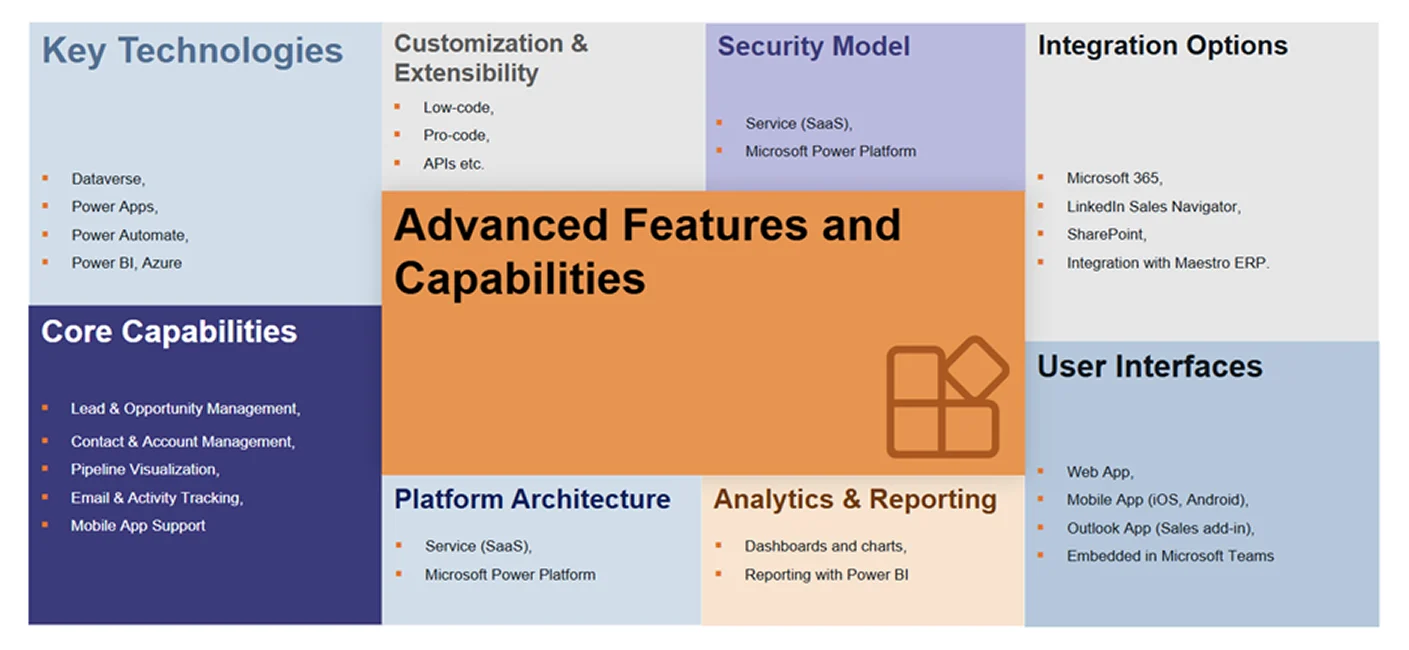
Efficient Workflows
Efficient workflows are the basis of a high-performing sales organization, and Dynamics 365 Sales offers powerful tools to design and automate them. By crafting streamlined sales processes, businesses can ensure consistency, reduce friction, and guide sellers through each stage with clarity.
Therefore, efficiency is the key to closing deals faster. Dynamics 365 enables:
- Automated lead qualification using scoring models
- Follow-up reminders triggered by inactivity
- Business Rules to enforce data quality
- Power Automate flows for cross-platform automation
- Mobile access
By designing smart workflows, teams can reduce manual effort and focus on selling. Lead qualification and follow-ups can be automated using scoring models and scheduled reminders, freeing up time for more strategic engagement. With Business Rules, teams can enforce data integrity and trigger actions based on field values, while Power Automate enables cross-platform workflows that connect Dynamics with other apps and services.
Sales Automation
Sales automation in Dynamics 365 Sales transforms how teams manage their pipeline by reducing manual effort and accelerating deal progression. With auto lead scoring and assignment, the system intelligently evaluates prospects based on predefined criteria and routes them to the right sales reps, ensuring faster response times. Predictive opportunity scoring uses AI to assess the likelihood of closing a deal, helping sellers prioritize high-value opportunities. Prebuilt email templates and sequences streamline outreach, enabling consistent and personalized communication at scale. Meanwhile, automated reminders and follow-ups keep engagements timely and proactive, minimizing the risk of missed interactions.
Moreover, automation in 2025 goes beyond basic triggers:
- Auto-assignment of leads based on territory or product interest
- Predictive scoring to prioritize high-conversion opportunities
- Email sequences for nurturing leads
- AI-generated follow-ups based on meeting notes and sentiment
Together, these automation features help salespeople spend less time on admin and more time building relationships.
Integrations That Matter
Dynamics 365 Sales offers seamless integrations that enhance productivity and unify communication across platforms.
- Outlook
With Outlook, users can track emails, sync calendars, and access CRM data directly from their inbox, ensuring every interaction is logged and actionable.
- Teams
Integration with Microsoft Teams brings collaboration into the CRM, allowing sales reps to chat, share updates, and co-author documents within records.
- SharePoint
SharePoint serves as a powerful document management system, linking files to accounts and opportunities for easy access and version control.
- Power BI
Power BI integration enables sales teams to visualize performance metrics, pipeline trends, and customer insights through interactive dashboards and custom reports, driving data-informed decisions directly from within Dynamics 365.
- Power Apps and Power Pages
With Power Apps, organizations can build custom applications tailored to specific sales processes, while Power Pages allow for secure, external-facing portals that connect customers and partners to CRM data, streamlining engagement and reducing manual effort.
- Power Automate
Power Automate empowers users to create automated workflows that eliminate repetitive tasks, such as lead assignment, follow-up reminders, and approval processes, boosting efficiency and ensuring timely actions across the sales cycle. It also enables advanced system customization by connecting disparate apps and services, allowing organizations to tailor automation to their unique business logic and operational needs.
- Other Microsoft tools
Dynamics 365 Sales also integrates with a broader suite of Microsoft technologies that enhance operational agility and cross-functional collaboration. Microsoft Excel allows users to analyze CRM data with advanced formulas and pivot tables, making it easier to manipulate and interpret sales figures. OneNote enables note-taking directly within customer records, helping sales teams capture meeting insights and action items in context. Microsoft Forms can be used to gather customer feedback or lead information, feeding responses directly into Dynamics for follow-up. Azure provides scalable cloud infrastructure and AI services that support custom development, data storage, and predictive analytics, while Microsoft Viva connects employee experience insights to CRM workflows, helping sales managers monitor engagement and performance.
- Third-party apps
Tools like Mailchimp, DocuSign, and LinkedIn Sales Navigator extend the platform’s capabilities, enabling targeted marketing, streamlined contract workflows, and enriched prospecting – all within a single, connected ecosystem, making integration seamless.
These integrations reduce context switching and improve productivity across platforms.
AI Capabilities in 2025
In 2025, AI capabilities in Dynamics 365 Sales have evolved into indispensable tools that elevate every aspect of the sales process.
AI is no longer a buzzword but a daily companion for sellers:
- Copilot for Sales
With Copilot for Sales, users can interact with the system using natural language, asking questions like “Show me deals closing this week” or “Suggest follow-up actions”, making CRM navigation intuitive and efficient.
- Conversation Intelligence
Conversation Intelligence analyzes call recordings to detect sentiment, highlight key topics, and surface actionable insights, helping sellers refine their approach.
- Predictive forecasting
Predictive Forecasting leverages historical data and market trends to project revenue with greater accuracy.
- Next Best Action recommendations
They guide reps toward the most impactful steps to move deals forward.
- Smart Summaries
AI-generated summaries and follow-ups save time by automatically compiling meeting notes and drafting personalized emails, allowing sales professionals to stay focused on building relationships and closing deals.
These features turn data into decisions, helping sales teams act faster and smarter.
Empowering Sales Agents
Empowering sales agents is a central focus of Dynamics 365 Sales, and in 2025, the platform delivers tailored experiences that boost productivity and engagement.
-
With role-based interfaces, each user, from inside sales reps to field agents, sees tools and data relevant to their responsibilities, reducing clutter and enhancing focus.
-
The mobile-first design ensures seamless access to CRM features on smartphones and tablets, even when offline, enabling reps to stay connected and responsive wherever they are.
-
For new team members, Viva Sales offers integrated training and onboarding, combining guided learning paths with real-time coaching to accelerate ramp-up and ensure long-term success.
Thus, with personalized dashboards and AI assistants, agents can focus on what they do best: selling.
Conclusion
Dynamics 365 Sales in 2025 offers a strategic advantage for companies seeking to modernize their sales operations. With intelligent automation, deep customization, and seamless integrations, it empowers teams to build stronger customer relationships, improve forecasting accuracy, and accelerate deal closures. Whether you are just starting out or looking to refine your existing setup, the platform provides flexible tools and guided onboarding to help you tailor the experience to your business needs.
Discover the benefits that our Microsoft Dynamics 365 Sales service can bring to your business.