




A Short Reference about the Author
Yevhen is a highly experienced AI expert who handles unique and complex tasks related to AI assistant implementation and workflow automation.
Introduction
The functionality of AI assistants is in high demand for automating routine tasks previously performed by people, such as user support, document entry, primary processing, and data conversion. At the same time, AI assistants, like any other tool based on artificial intelligence, can make mistakes in their responses. These errors are typically corrected by human operators, and the instructions for the AI assistant should be updated to prevent them from recurring. This can be a labor-intensive and long-term process, as errors are usually detected by a specialized specialist from the business department, and adjustments to the system instructions should be made by a prompt engineer from the relevant IT department.
In this article, we will review a case study on how such a task can be automated, avoiding the lengthy process of delivering changes to AI assistant instructions.
For a more comprehensive understanding, refer to our AI Assistant for Invoice Processing case.
The Problem Statement
The AI assistant under consideration is the one designed for accountants. Its task is to assign correct ledger accounts for transactions created when processing incoming invoices.
The client’s accounting team receives many invoices daily from various suppliers (800+ per month). Each invoice differs in format and content. The key problem is the lack of a unified layout: incoming invoices vary in structure, format (including scans and photos in formats such as PDF, JPG, PNG, etc.), and data content. Moreover, the data from all the invoices is entered into the CRM. Filling in all this amount of information manually takes a lot of time.
Manual processing takes 8–12 minutes per invoice and may result in mistakes in amounts or dates, slow progress, time-wasting, unclear expense tracking, or even missing information.
To address these challenges, we developed a smart AI assistant. Our solution was designed to automate the process of recognizing incoming invoices, extracting data from PDFs and images, and distributing this data to the relevant fields in the CRM records. Additionally, it automated the creation of split entries for each incoming invoice and associated them with the appropriate general ledger account numbers.
At the beginning of the project, it was implemented in the following way:
- The incoming invoices were processed by the AI assistant.
- The AI assistant had system instructions with the ledger of accounts, or rather, the part of the ledger that was related to invoice processing.
- At the output, the AI assistant issued the same invoice, but with assigned ledger accounts for each invoice line.
- The accountant used UI to review the invoices with accounts, made adjustments if needed, and then saved the final invoice to CRM.
Fig. 1 shows the initial solution scheme:

Implementation
To implement automatic updating of system instructions, we needed to split the system instructions into two blocks:
- Fixed, which contains basic instructions that cannot be changed.
- A block of adjustments that will be built dynamically and will contain clarifications to the fixed block.
We set a fixed block in the settings of our application, and only the application administrator could change it.
We built the adjustment block dynamically based on the edits that business users make in the application interface. Accordingly, to gather information for the adjustment block, we had to collect all the edits made by users to the transactions after the AI assistant offered the user a list of automatically generated transactions.
! Note. Working with duplicates warrants separate mention. When users make adjustments, it is quite possible that they will have to make the same correction several times. Thus, several identical adjustments will be registered in the system. Of course, we can include them in the system instructions as many times as users have made them, and the AI assistant will work correctly. But there is one nuance: system instructions are added to the request every time you call the AI assistant and increasing their size leads to an increase in the number of tokens in the request, and accordingly, makes the request itself more expensive.
Therefore, we removed the duplicates to prevent unnecessary growth in the number of tokens and service costs.
! Note. Regarding storage, we needed a record of all changes made, so we utilized a database to store the adjustment history.
The Solution
Our solution included the following steps:c
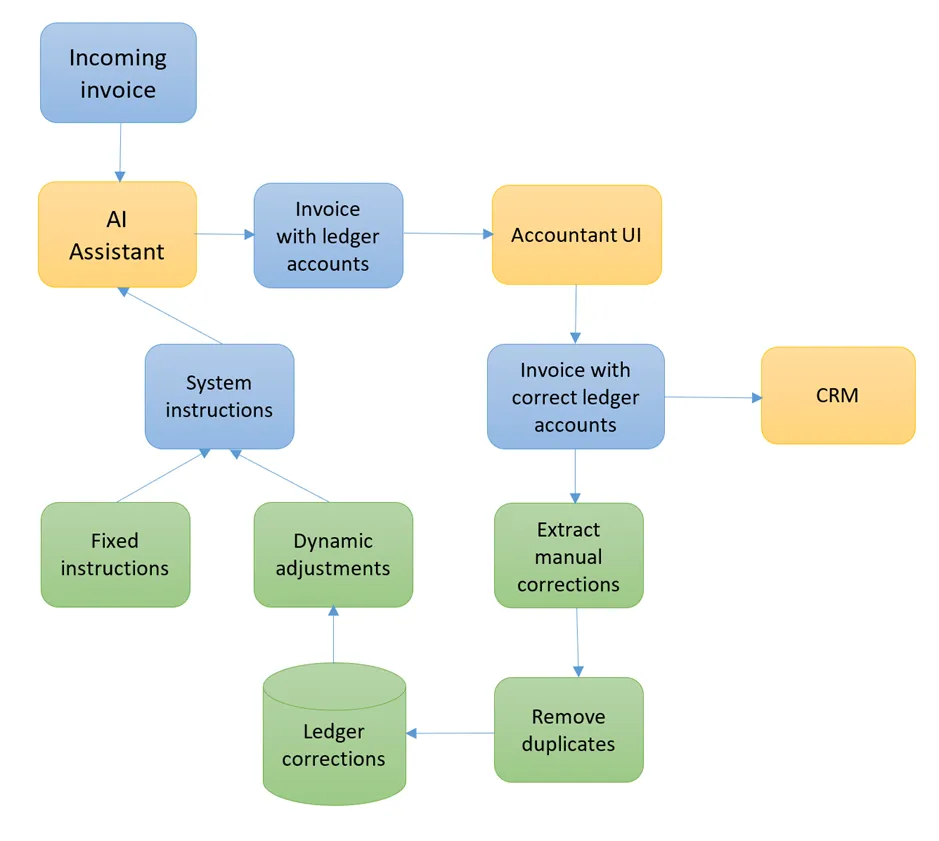
- The AI assistant processes the invoice and assigns ledger accounts for goods and services in the invoice.
- The accountant checks the list of ledger accounts assigned in their user interface and makes adjustments as necessary.
- The system compares the ledger accounts saved by the accountant with the original ones generated by the AI assistant. If it identifies discrepancies, it considers them as adjustments and saves them in the database.
- The system collects all the adjustments saved in the database, deletes possible duplicates, and forms a text block of adjustments from them.
- The system extracts the fixed block, combines it with the adjustment block into a single system instruction, and updates the AI assistant.
Fig. 2 shows the final solution:
! Note. In case of a conflict between adjustments, when one ledger account is selected for a product or service in one case and another ledger account is chosen in another case, the system will remember the last change and use it as the instruction.
We will not consider in detail all the implementation steps, as some of them are quite trivial. Therefore, we will focus only on those specific to the AI assistant and its instructions:
1. Formation of a list of manual adjustments
In our case, it was quite easy to determine the fact of a correction: if the account number selected by the accountant differs from the one set by the AI assistant, then an adjustment has occurred.
var ledgerEntriesToBeCorrected = await _context.InvoiceLines.Where(x => x.LedgerAccountAssigned != x.LedgerAccountFinal && x.LedgerAccountFinal != null).ToListAsync();
2. Removing duplicates
Our goal was to keep the instructions as short as possible, so we combined the instructions for each account into one entry, like “Please use the account AccountNumber for services or products: Product 1, Product 2, Product 3”, etc.
var CorrectLedgerAccounts = ledgerEntriesToBeCorrected.Select(x => x.LedgerAccountFinal).Distinct();

string result = "";

foreach(var account in CorrectLedgerAccounts)

{

    var CorrectionEntries = ledgerEntriesToBeCorrected.Where(x => x.LedgerAccountFinal == account).Select(x => x.ItemName).Distinct();

    var AccountCorrectionItems = string.Join(", ", CorrectionEntries);

    var accountCorrectionHint = $"Please use account {account} for services or products: {AccountCorrectionItems} \r\n";

    result += accountCorrectionHint;

}
3. Combining the adjustments with the fixed instructions
At the output of the previous step, we got dynamic adjustments. We simply needed to combine them with fixed instructions.
var accountHints = await GenerateAssistantHintAsync();
var FinalInstructions = FixedAssistantInstructions + accountHints;
4. Updating the assistant
Finally, we updated the assistant:
await _openAIClient.UpdateAssistantAsync(AssistantId, FinalInstructions, 0);
    public async Task<string> UpdateAssistantAsync(string AssistantId, string Instructions, decimal Temperature)
    {
        HttpClient client = HttpClientFactory.Create();

        client.DefaultRequestHeaders.Authorization = new AuthenticationHeaderValue("Bearer", OpenAIApiKey);
        //client.DefaultRequestHeaders.Add("OpenAI-Beta", "assistants=v2");
        client.DefaultRequestHeaders.Add("api-key", OpenAIApiKey);

        var request = new AssistantUpdateModel
        {
            Instructions = Instructions,
            Temperature = Temperature
        };
        var requestString = JsonConvert.SerializeObject(request, new JsonSerializerSettings { NullValueHandling = NullValueHandling.Ignore });

        HttpContent httpContent = new StringContent(requestString, Encoding.UTF8, "application/json");

        var response = await client.PostAsync(AssistantURL + "/" + AssistantId + "?api-version=2024-08-01-preview", httpContent);

        var responseContentString = await response.Content.ReadAsStringAsync();
        response.EnsureSuccessStatusCode();

        var responseContent = JsonConvert.DeserializeObject<AssistantModel>(responseContentString);
        return responseContent.Id;

    }
! Note. When updating instructions for assistants, consider the parameter "Temperature", which represents a probabilistic deviation from the optimal parameters selected by the neural network. For AI assistant-workers, like in our case, the temperature should be set to a minimum or even zero.
! Note. Pay attention to the commented line:
//client.DefaultRequestHeaders.Add("OpenAI-Beta", "assistants=v2"); ! Note. The AI assistant API is similar between OpenAI and Microsoft, but this header must be present if you are updating an OpenAI assistant (or making any other API calls) and must not be present when calling the Microsoft API.
Thus, with all these actions implemented, we have produced an AI assistant that recognizes invoice data, fills in the CRM info in the relevant fields, and learns from user corrections.
Automated invoice processing has no limits and can be completed in just about 1 minute. Employee involvement is minimized: they are required to verify data and provide final confirmation in the system for further payment processing.
Summary
We have received a convenient solution with some obvious advantages for its users. The AI assistant is easily trained using Azure OpenAI, and no prompt engineering is required. The invoice data is updated in real time immediately after the accountant’s review, and the processing time now takes 30–60 seconds. The accounting workload has been cut by over 50%.
Therefore, routine tasks previously performed by people, such as document entry, primary processing, or data conversion, can be automated and optimized, thereby avoiding a lengthy process of delivering changes to AI assistant instructions.