


UDS License Calculator
Are you having trouble calculating Microsoft licensing and avoiding over-licensing in Dynamics 365? Try our add-on to optimize your budget with a few clicks.
Calculate your Microsoft license and Dynamics 365 license costs with several clicks.


The Problems our Microsoft License Calculator Solves

- Actual license usage auditing: per user, per product, per department
- Comparing the license usage vs the assignment
- Calculating Microsoft licensing costs accurately
- Calculating Dynamics 365 licensing for multiple modules, including Dynamics 365 CE licensing costs
- Forecasting Microsoft licensing budget
- Reducing Microsoft 365 licensing expenses by identifying which licenses are underused, overused, or can be easily changed to cheaper options
Why You Need the License Calculator
Are you planning to update your Microsoft licenses but having difficulty understanding which licenses you need to purchase for the next period?
There are 2 options. The first one is to collect statistics on Dynamics 365 usage across all departments and explore the Microsoft Licensing Guide (over 60 pages) to determine which licenses cover which users and how much they cost. The second one is easy and stress-free: entrust this job to the UDS License Calculator. Our free tool will do that automatically!
Our Microsoft-certified add-on was created to analyze the features used by each Dynamics 365 user during a specified date range.
It works like a Microsoft cost calculator tailored to different product types. You can easily calculate Dynamics 365 Sales licenses, Dynamics 365 Marketing (D365 Customer Insights – Journeys) licenses, Dynamics 365 Customer Service licenses, Dynamics 365 Field Service licenses, Power Apps licenses, Microsoft Copilot licenses, Microsoft AI licenses, Azure licenses, Microsoft 365 (Office 365) licenses, and others.
Benefits


How the UDS License Calculator Works
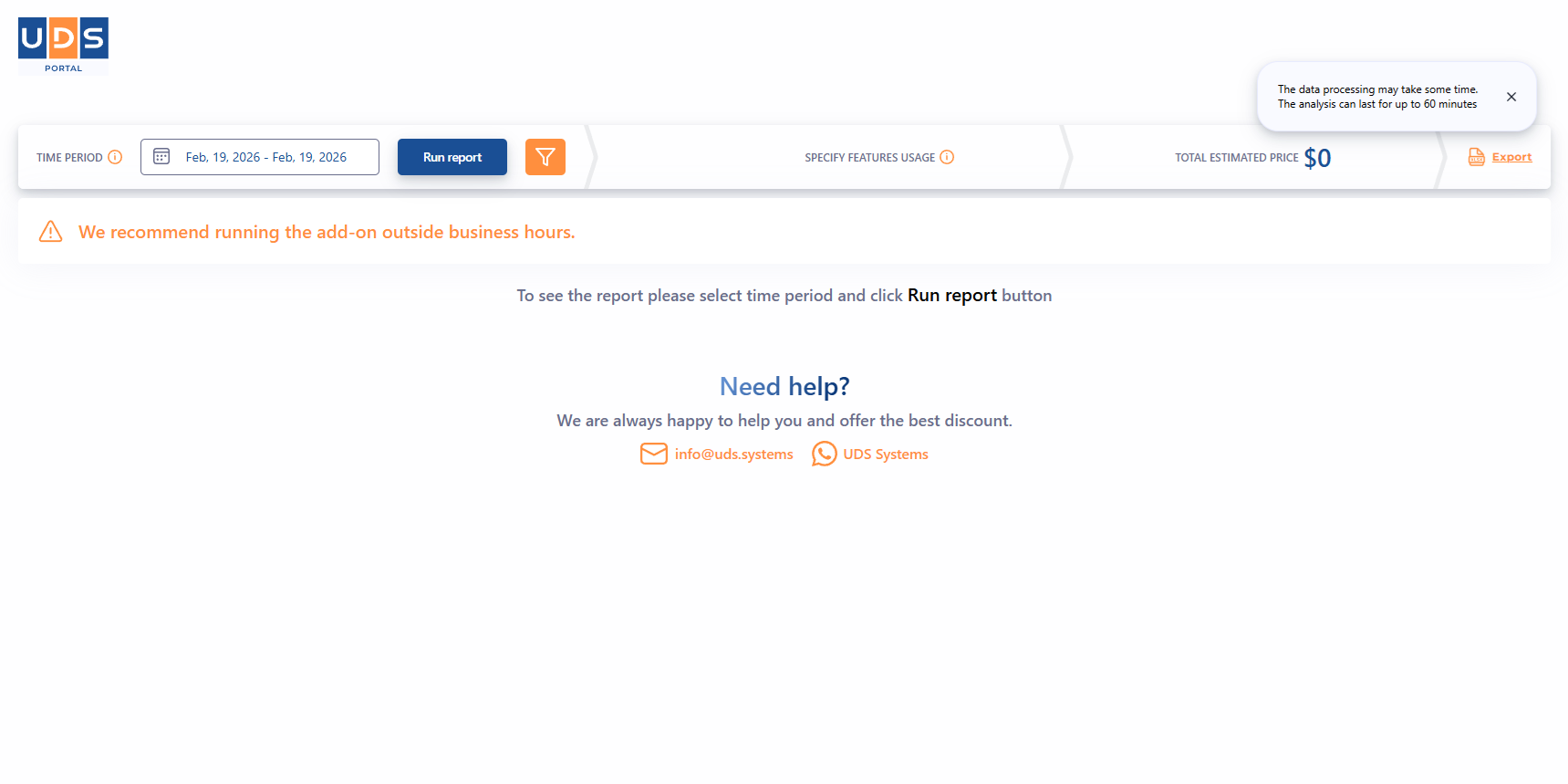
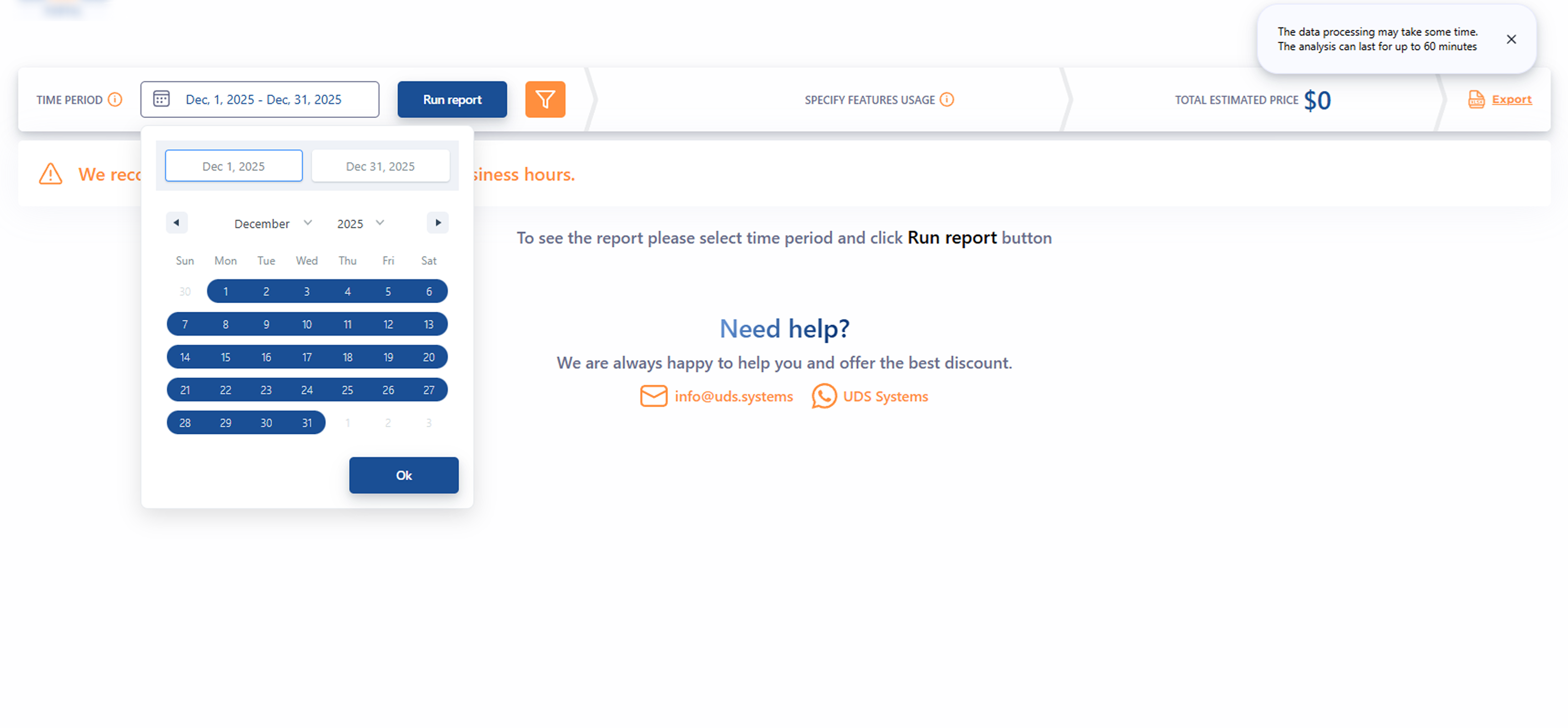
One of the key advantages of our add-on is its ease of use. You need only a few clicks to get a generated report:
The analysis will show you the full list of licenses and their estimated cost. Thanks to this License Calculator, you can analyze your license structure in real-time and avoid over-licensing.
The generated visual table shows the features your team used during the selected period and displays the approximate price.
You can also pre-calculate the cost of licenses after adding/removing functionality for each user.
Are You Ready to Start?
To determine the most profitable licenses to purchase and navigate prices, please visit our official AppSource/Microsoft Marketplace page and try the UDS License Calculator add-on for free.

UDS License Calculator Online
-
Compatibility: Microsoft Dynamics 365 Online and On-premises CRM
-
Cost: Free trial. Contact us for a subscription or possible discount options, further upgrade or customization requests.
-
️Last updated: 2026
-
License purchase: available on licenses.uds.systems
Licensing Services
After defining the estimated licensing costs, our clients often do not know how to optimize the budget and move forward. We understand the complexity of Microsoft licensing and regulations. We are here to help. Our set of services includes:

Microsoft licensing audit and compliance review

Licensing costs and policy optimization

License distribution
FAQs
To calculate Microsoft licensing costs per user, try a free UDS License Calculator. It is available on AppSource and compatible with MS Dynamics 365 (on-premises and online versions). After downloading and logging into the system, you will see the filtering button where you can choose which user licenses to check.
The UDS License Calculator is the best automated tool for analyzing Microsoft license usage. With this add-on, you can check estimated license costs for the selected period, user, and domain.
The pricing for Dynamics 365 Sales Professional and Enterprise is $65 and $105 per month, respectively.
You can compare Dynamics 365 plans directly on the official Microsoft resource:
Dynamics 365 Customer Service Professional pricing is $50 per month, and Dynamics 365 Customer Service Enterprise pricing is $105 per month.
The comparison of Dynamics 365 Customer Service plans is available below:
Power Apps subscription options include Power Apps per user and Power Apps per app pay-as-you-go meter.
The Power Apps per-user subscription allows users to access an unlimited number of custom applications and Power Pages websites. The Power Apps per-user pricing is $20 per user per month.
Power Apps per app enables users to run a single custom application and charges only for usage.
Power Apps Premium Plan (or Power Apps per user) includes unlimited Power Apps and Power Pages for the assigned user, connectors, custom tables, workflows, 250 MB Dataverse capacity, agentic features, and Microsoft 365 Copilot chat.
With a Dynamics 365 Field Service license, companies get full access to field service management features - work order management, scheduling, mobile access, and more. The Field Service application can be licensed per user and/or per device.
Dynamics 365 Field Service license and Dynamics 365 Field Service Contractor license provide mobile access.
Note: Dynamics 365 Field Service Contractor requires an existing Field Service license to purchase.
For canvas apps, you do not need to purchase the license. To create model-driven apps, a Power Apps or Dynamics 365 license is required.
For Power Apps guest access, the invitee is required to have a Power Apps per-app license or a Power Apps per-user license. This applies access to the canvas and model-driven apps.
Power Automate is licensed per user/month, per bot/month, GB capacity/month, and per flow/month. To calculate the Power Automate licenses, you should define:
- Whether you need premium connectors
- Whether you need DPA and RPA
- How many users and flows you need
Calculating Power Automate licenses can be confusing. We recommend using the free UDS License Calculator.
The Power Automate per-flow pricing is $100 per flow/month, with a minimum purchase of 5 licenses. One license allows the bot or process to be rolled up in a single environment. If the same bot or process is deployed in another environment, an additional license purchase is required.
Microsoft Copilot licensing uses Copilot Credits, a currency that allows users to access AI-automation features.
To optimize Copilot usage across Dynamics 365, you can purchase Dynamics 365 Sales Premium, Customer Service Premium, Finance Premium, or Supply Chain Management Premium licenses that include 1,000 Copilot Credits per user/month. These credits accrue at the tenant level and can be used as Copilot Credits purchased via the Microsoft Copilot Studio pay-as-you-go meter, the Microsoft Copilot Studio license (Copilot Credit pack), the Copilot Credit Pre-Purchase Plan, and the Copilot Credit Pre-Purchase Plan (P3).
Microsoft licensing advisory services are consulting and support services that help organizations calculate, manage, and optimize Microsoft licensing usage.
UDS Microsoft licensing services include the following:
- Microsoft licensing audit and compliance review
- Licensing policy optimization
- License distribution
Microsoft license assessment from UDS Systems includes:
- Reviewing the current license structure and usage
- Identifying overused, unused licenses, or those that can be changed to a cheaper option
- Defining the Microsoft license usage compliance
- Presenting a clear step-by-step action plan with established methodology
- Selecting the right licensing strategy tailored to your functional and performance requirements
- Maintaining security and data protection through proven practices
- Preparing for Microsoft updates and release waves
Do You Have Questions or Want a Demo?
Please fill out and submit the form for personalized assistance.
or