





A Short Overview of the Article
This article provides a detailed overview of the UDS License Calculator, a tool that helps companies choose the right set of Microsoft licenses to save time, money, and effort.
A Short Reference about the Author
Vlad is an experienced Dynamics 365 Consultant and Project Manager who manages a wide range of complex responsibilities, including Microsoft licensing and business process customization.
Introduction
Licensing in Dynamics 365 is one of the topics that nobody gets excited about until the renewal invoice arrives. Then suddenly it becomes urgent. Many companies assume that licensing decisions are something to review once a year, usually under pressure and with very limited time.
However, there are different license types, roles, pricing levels, feature sets, attached modules, and a licensing guide that can easily run 60 pages. Add changes in staffing, new projects, growing departments, or acquisitions, and suddenly nobody knows whether licenses still match actual usage.
As a result, companies either overspend on licenses they do not fully use or risk compliance issues because nobody really knows which features are consumed by which teams. They think the only way to understand licensing is to dig through logs manually, export reports to Excel, or attempt to interpret Microsoft documentation. It is slow, confusing, and easy to make mistakes.
That is exactly why the UDS License Calculator has been created. It is a tool designed to make licensing clear, practical, and based on real data instead of guesswork.
Besides, we can provide professional assistance in optimizing and purchasing a set of Microsoft Dynamics 365, Power Platform, and Microsoft 365 licenses for your business.
Explore the Microsoft licensing services from UDS Systems.
What the UDS License Calculator Actually Does
Our add-on automatically analyses how users interact with Dynamics 365 and additional tools. It checks which features, modules, and entities each person accessed during a selected period and compares that with the capabilities included in available license types. Instead of guessing which license they need, the users see a clear recommendation based on real behaviour.
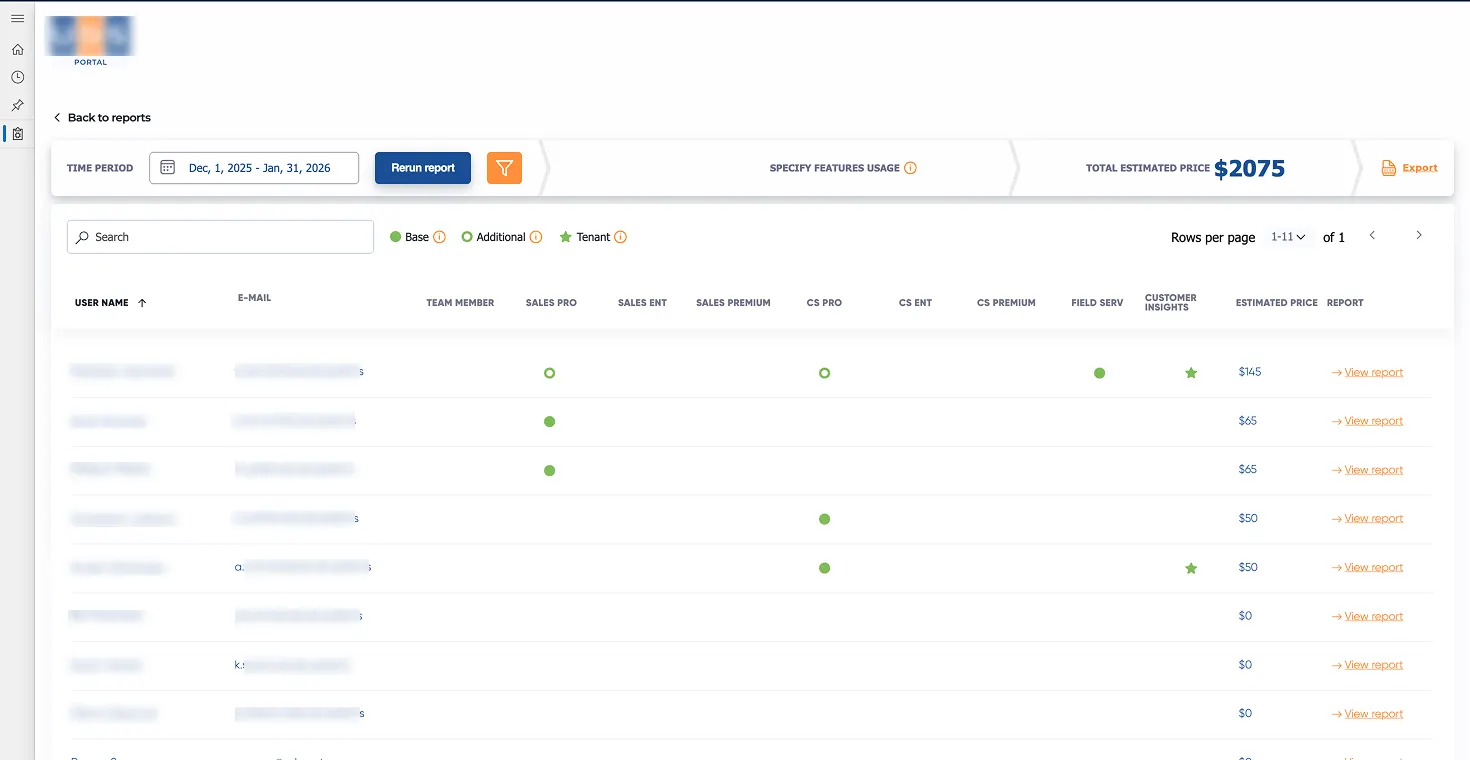
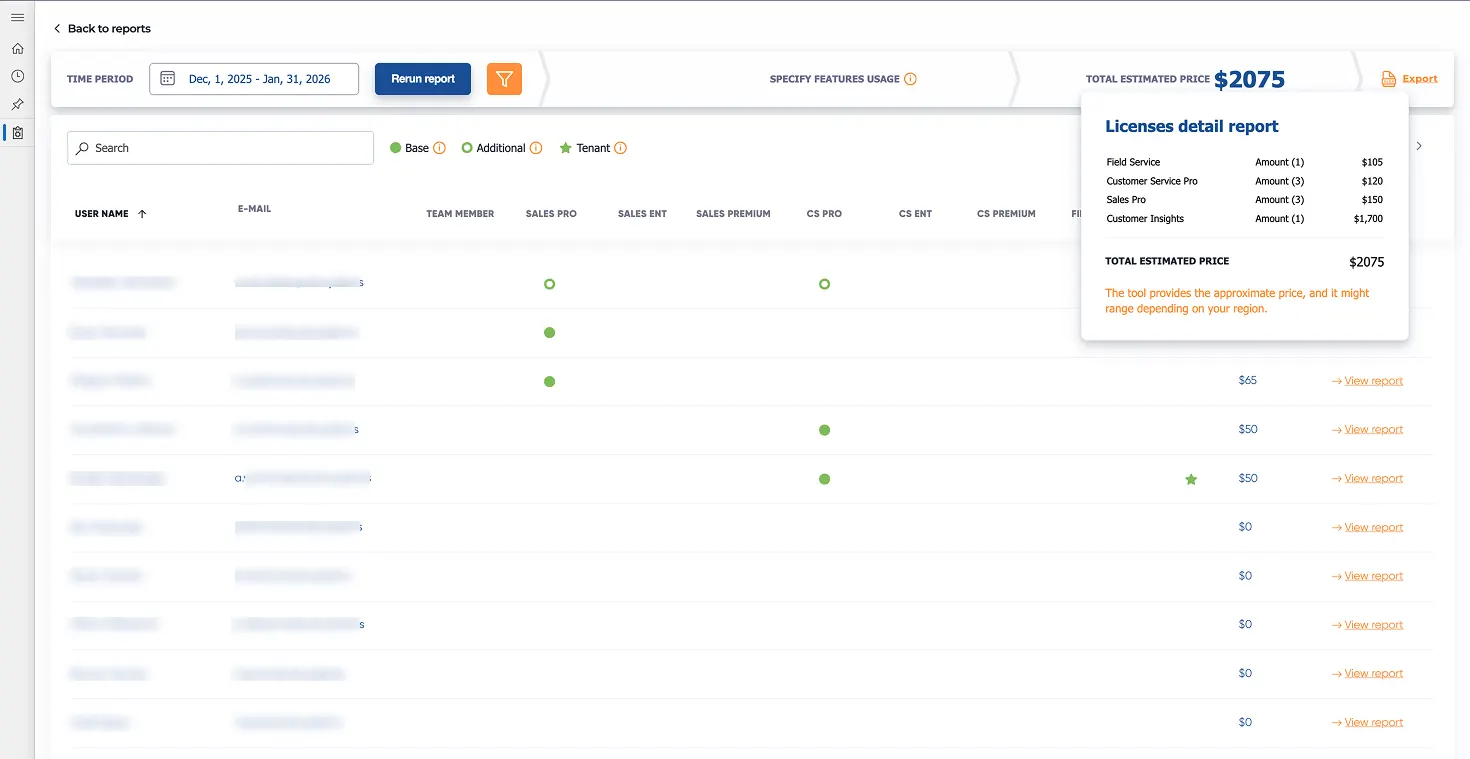
The results are displayed in a simple visual format. For each user, you can see what they use, whether their current license aligns with that usage, and what the cost impact would be if you changed their license.
You can run various “what-if” scenarios to understand how they would affect your budget.
The key features of the UDS License Calculator are the following:
- License analysis for a wide range of Microsoft products with cost breakdown, such as Dynamics 365, Power Platform, Azure, Microsoft 365, Copilot, etc.
- Real-time analysis with dynamic changes and cost updates
- User-based analysis
- Role-based licensing scenarios to check the actual usage of licenses based on the job functions and required features
- Side-by-side plan comparison
- Multiple licensing models' comparison
- License budget estimation
- Unused licenses' detection
- Extensive reporting with export options and history saving
- License upgrade or downgrade suggestions
Why This Tool Is Popular
The first thing companies notice is the opportunity to save money. Many companies pay for expensive licenses even when a part of their team only uses basic functionality. Once they see the real usage numbers, it becomes obvious where adjustments can be made safely.
The second benefit is clarity. Instead of trying to interpret complex technical rules, you receive a straightforward explanation of which license fits which user. Finance teams appreciate transparency. IT teams value automation, and operational leaders can make informed decisions without becoming licensing experts.
You can audit actual Microsoft license usage. And then optimize Microsoft license costs. Our License Calculator is a free tool that would do that automatically!
Another practical advantage is planning. When restructuring teams or preparing for renewals, it is incredibly helpful to simulate different setups and compare costs before committing. The tool does all of that instantly.
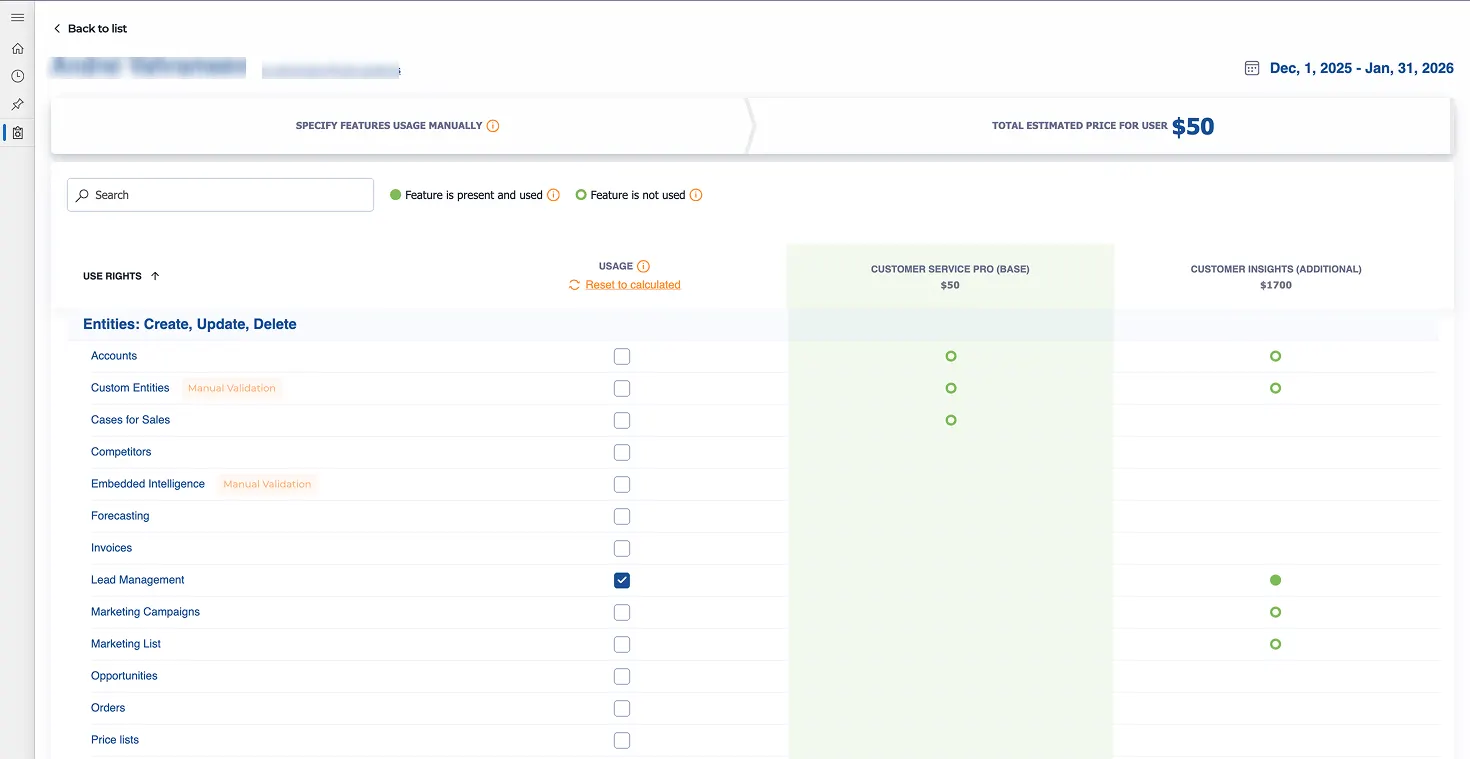
In general, the UDS License Calculator helps with the following common problems and questions:
- How to conduct Microsoft usage vs assignment analysis
- How to identify Microsoft unused or underused licenses, including unused Dynamics 365 licenses
- How to calculate Dynamics 365 licensing for multiple modules
- How to optimize Dynamics 365 CE/CRM license allocation and reduce Dynamics 365 licensing costs
- How to optimize license consumption for Dynamics 365 Sales, calculate licenses for Dynamics 365 Customer Service and Dynamics 365 Customer Insights – Journeys cost, identify actual usage of Dynamics 365 Field Service, and forecast Field Service licensing costs for future periods
- How to monitor Power Apps license usage
- How to calculate Power Platform licensing costs
- How much Microsoft Copilot per user costs, and what the cost of Copilot for Dynamics 365 is now
That is why this is one of the best tools to optimize Microsoft licensing.
Explore the D365 Licensing Calculator.
Accordance to the Latest Microsoft Licensing Updates
Microsoft released an updated Dynamics 365 Licensing Guide in October 2025. We have updated the UDS License Calculator, accordingly, including revised license types, updated mapping of features, and terminology changes. This means that any analysis generated today reflects the most current licensing rules rather than outdated assumptions.
Read the latest Microsoft licensing documentation.
! Note. The license pricing remains actual and updates automatically in the system via direct integration with the license purchase platform.
Conclusion
We created this add-on after seeing how much time customers spent trying to understand licensing and how much money has been wasted due to incorrect license assignments.
With the UDS License Calculator, you do not need to manually track a large amount of information. Everything is automated, visual, and actionable.
Licensing should not be a guessing game. It should be a strategic decision supported by real data. Our tool helps companies gain control, reduce unnecessary costs, and make confident decisions about their Dynamics 365 environment.
You can try our Microsoft Licensing Calculator on the AppSource or book a free demo.
Frequently Asked Questions that May Interest You
The UDS License Calculator analyses real user activity within your Dynamics 365 environment over a selected time period. It reviews which features, modules, and entities each user accessed and compares that behaviour to the capabilities included in available license types. The analysis is automated and based on actual usage, not assumptions or manual input.
No. The tool is designed to present complex licensing data in a simple, visual, and easy-to-understand format. You do not need to interpret Microsoft’s licensing documentation or manually analyze logs. Both IT and finance teams can quickly check the license usage and make informed decisions without becoming licensing specialists.
Moreover, you can always contact our Microsoft-certified specialists for a detailed consultation on the issue.
Learn more about the UDS Licensing Services.
Yes. The tool has been updated according to the October 2025 Microsoft Dynamics 365 Licensing Guide and pricing. It reflects the latest license types, feature mappings, and terminology changes, ensuring that recommendations are based on current Microsoft requirements.
Absolutely. In addition to analyzing current usage, the tool allows you to simulate different scenarios, such as team restructuring, growth, or license reassignments. This makes it easier to forecast budget impact, prepare for renewals, and make strategic decisions well before invoices arrive.
Related Content
UDS blog articles: