





A Short Reference about the Author
Yurii is a highly experienced Senior Dynamics 365 Developer handling numerous unique, sophisticated tasks within clients’ projects, including those closely related to Microsoft Dataverse usage and API throttling for high-load systems.
Introduction
When building scalable enterprise systems, service accounts often operate as silent workhorses, performing automated API interactions between these systems. However, under high load, even these automated processes can hit invisible walls: API rate limits.
This article offers valuable insights into how to deal with API rate limits in large systems, detailing how our team diagnosed and resolved persistent HTTP 500 errors caused by Microsoft Dataverse service protection throttling, and implemented long-term solutions for handling large volumes of requests reliably.
Additionally, it offers one of the most reasonable API quota management strategies and provides simple and effective ways to avoid exceeding API quotas.
Read the article and find out more about what happens when you exceed API limits, what a safe number of API calls per second is, what the best way to handle 500 errors is, and what the best way to connect to Dataverse API is.
The Problem Statement
The client’s B2C application integrates with Microsoft Dataverse via the ServiceClient, authenticating through a service principal, which is mapped to a Dataverse application user, functioning as a service account, to perform backend operations, including role retrieval, data synchronization, and user session validation. Under peak load, several users began experiencing unresponsiveness while navigating the portal. In some cases, delays of over 30 seconds were recorded.
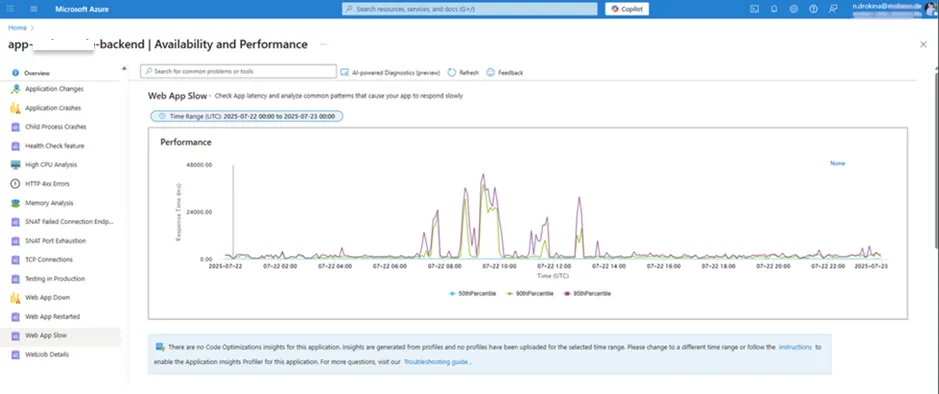
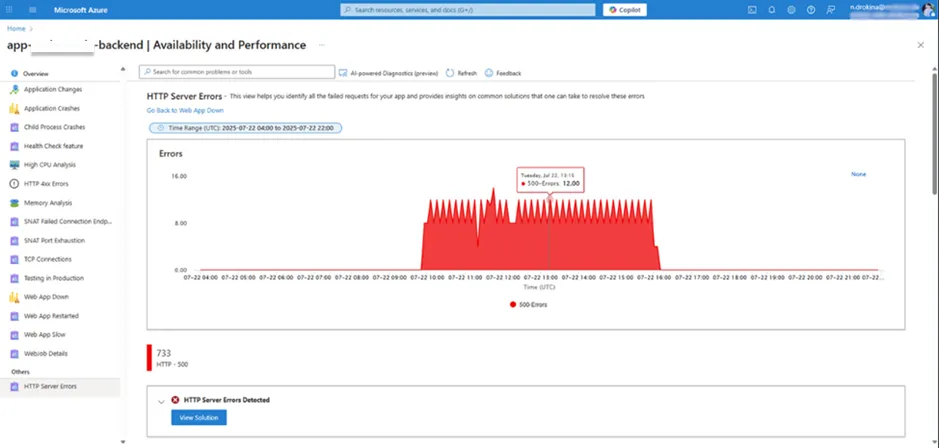
We observed high HTTP 500 rates in Azure Application Insights logs. However, the front-end systems were still receiving HTTP 200 responses due to the automatic retries from the SDK, which disguised the actual problem.
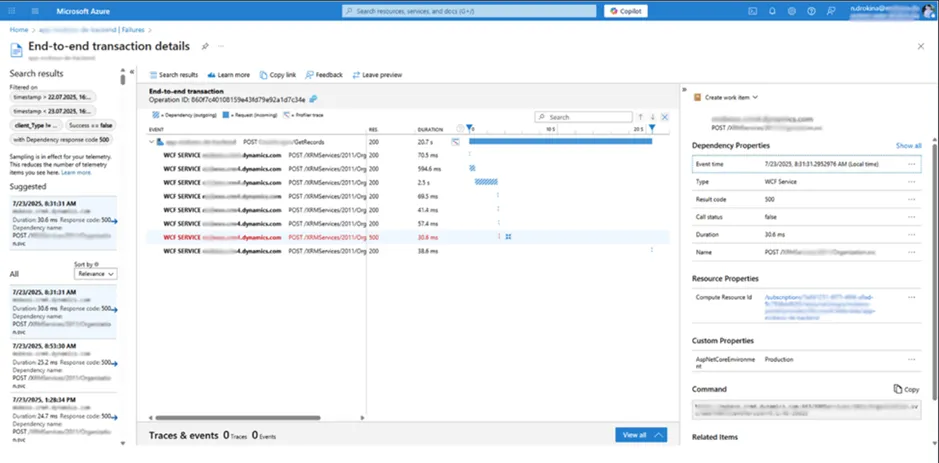
A closer look at the back-end logs disclosed the genuine source of the problem:
[ERROR] Message: Number of requests exceeded the limit of 6000 over a time window of 300 seconds.
This error indicated that we had hit Dataverse's Service Protection Limits, a built-in safeguard to prevent any single user or app from overwhelming the system.
The Root Cause Analysis
Identifying the root cause was far from straightforward. Several factors obscured the issue:
-
SDK retry masking
The Dataverse SDK’s default retry mechanism (up to 10 retries per failed request) meant that even when a request failed due to throttling, subsequent retries would often succeed. As a result, monitoring tools showed successful 200 OK responses, hiding the real problem from developers and ops teams.
-
Lack of throttling telemetry
Since the traffic originated via the SDK, no clear throttling telemetry was available through the Power Platform Admin Center or Application Insights. It was only after reducing MaxRetryCount to 1 that we consistently began to see raw 500 errors in logs.
-
Affinity cookie bottleneck
The default setting EnableAffinityCookie = true routed all traffic to a single Dataverse node. This effectively concentrated the load, causing us to hit the API limit more quickly and frequently.
The Implemented Solutions
To fully resolve the Dataverse HTTP 500 errors caused by service protection throttling, we implemented a coordinated series of improvements. The root cause was the exceeding Dataverse’s per-user request limit, which required a combination of SDK configuration changes, load distribution, and backend optimization. Each phase promoted recovering stability and performance under high-load conditions:
-
SDK retry reduction
By default, the ServiceClient retries failed requests up to ten times. This behavior obscured the actual errors, rendering diagnostics nearly impossible. Reducing the retry count exposed the actual service protection errors in the logs.
Implementation: ServiceClient.MaxRetryCount = 1;
Result: The change disabled automatic retries, making this error message visible:
Message: Number of requests exceeded the limit of 6000 over a time window of 300 seconds.
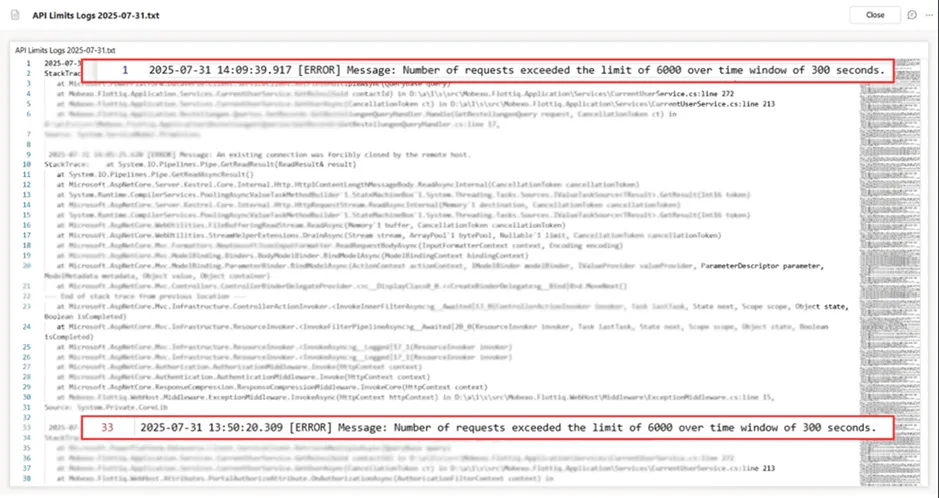
This confirmed that the issue was caused by the Dataverse’s service protection limits, which apply per app user and restrict API usage to 6,000 requests within a 5-minute sliding window.
Reference: Refer to Service protection API limits
-
Affinity cookie disabled
By default, Microsoft Dataverse SDK uses sticky sessions, also known as node affinity. When EnableAffinityCookie = true, the ServiceClient instructs the server to bind all subsequent requests from that client to the same backend Dataverse node using an affinity cookie. While this can slightly improve caching performance for low-volume workloads, it creates a bottleneck under high load:
- All requests from a busy application instance are routed to a single Dataverse node.
- That node becomes overwhelmed, triggering service protection limits and HTTP 500 errors, even when other nodes are idle.
- This makes the entire integration unstable, particularly in scenarios involving thousands of parallel API calls (e.g., portals, bulk data syncs).
Implementation:
To mitigate this issue, we explicitly disabled affinity by setting: ServiceClient.EnableAffinityCookie = false;

Result:
- Traffic is load-balanced automatically, preventing node-specific throttling.
- System throughput increased, particularly during peak hours.
- Error rates dropped significantly, and the application became more responsive and reliable.
Reference: Send parallel requests using ServiceClient
-
ServiceClient separation by App Users
Instead of funneling all requests through a single Azure App Registration and Dataverse service principal, we split the functionality across multiple app users:
- App User 1: Handles one group of features (e.g., product configuration)
- App User 2: Manages a different functional domain (e.g., task views)
- App User 3: Takes care of integrations (e.g., external APIs)
! Note. Each app user authenticates with their own ServiceClient, distributing requests and multiplying the available rate limit window.
This approach:
- Requires minimal changes to existing code
- Leverages Dataverse's per-user quota system
- Enables scalable horizontal growth of integrations
Tip: Use separate Azure App Registrations with appropriate roles for each app user and isolate them logically in code (e.g., DI containers, services per domain).
-
Back-end rRefactoring and optimization
Beyond the SDK and configuration changes, reducing unnecessary API usage was critical. Several backend optimizations were implemented:
- Refactored duplicated or inefficient FetchXML and QueryExpression queries.
- Centralized and cached the GetChildCompany logic, previously implemented inconsistently in over 20 places.
- Removed or optimized plugins and workflows that triggered on every write operation.
- Delayed non-critical background jobs (e.g., imports, analytics refresh) to run during off-peak hours.
- Replaced dashboard-heavy homepage with a lightweight module to reduce load at login.
- Set requireNewInstance = false in OrganizationServiceRequest to avoid redundant token requests.
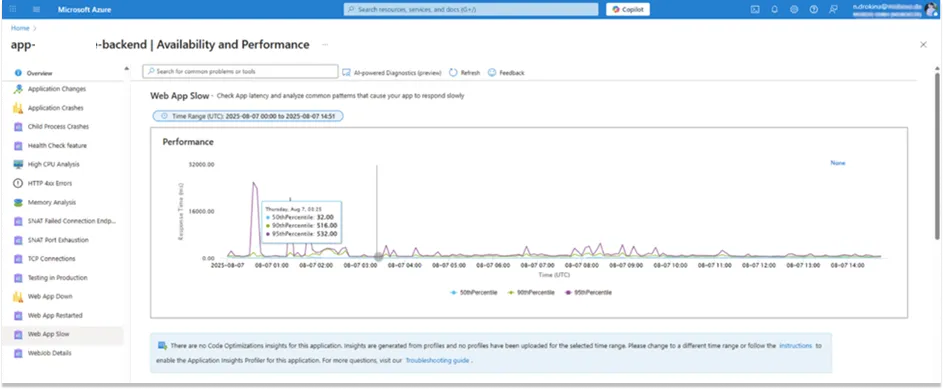
As a result of these coordinated improvements, we successfully eliminated HTTP 500 errors and stabilized system performance under high load, as confirmed by Azure performance metrics.
Conclusion
API rate limits can cause critical backend failures, especially when default SDK settings mask those issues. Nevertheless, through a structured diagnosis and targeted fixes, such as reducing retry attempts, disabling affinity cookies, load distribution across multiple app users, and backend optimization, we restored system stability and scalability. Thus, now, we have in our arsenal some practical tips on how to use API with Microsoft Dataverse.
Developers integrating with Microsoft Dataverse in high-load scenarios should:
- Monitor for 500 errors with hidden ones
- Adjust retry policies during debugging
- Distribute traffic across app users
- Disable affinity cookies when safe to do so
- Refactor and reduce unnecessary CRM calls
By proactively managing these factors, it is possible to build robust, scale-safe API integrations with Microsoft Dataverse that allow overcoming API call limits and maintaining performance under pressure.